Scraping and extracting from a website can be very daunting if the website has a lot of data. If you are scraping data from a website without using automation software for web scraping, like Web Content Extractor, then you are likely to spend a lot of time on the whole process.
But if you use automation software, you can finish the work earlier and with minimal effort.
Certainly, this tool is useful and helps you do tedious tasks easily, but there is another plus point to this tool: accuracy.
Why Use Automation for Web Scraping
If you are not using an automated tool to extract data from an HTML website, you are most likely to have errors during data extraction. This can happen due to several reasons, but the most prominent one is human error.
However, with the use of this tool, such errors are minimized. Once you specify the type of data and set its fields, you will get all the similar data scraped without the hassle of doing it manually.
This significantly reduces errors and saves time.
About Web Content Extractor
Newprosoft’s Web Content Extractor has been a scraping player for many years, even before some other online or cloud-based scraping platforms entered the web scraping market.
Its desktop scraping software has been a very optimal choice for users for a long time. Now, it also provides an online substitute to itself.
You don’t have to download Web Content Extractor anymore. You can use its online version and perform scraping directly from your browser.
This has increased productivity and also opened the door for integration of scraping with other tools via APIs.
Introduction: Functions of Web Content Extractor
Web Content Extractor is beneficial in obtaining data from a website without any hassle. With this tool, you can:
- Extract product pricing data
- Collect real estate data
- Scrape eCommerce products
- Extract songs or movie information
- Gather news and articles on specific topics
- Extract information from dating sites and job boards
This is only a short list of its functions.
You are not limited to the above applications. It can work with almost any kind of web information and can be customized to deal with different website structures.
Automation and Ease of Use
Web Content Extractor is highly automatic. You can design your scraper directly in your browser using a point-and-click interface.
This interface allows you to define scraper navigation, crawling patterns, and data fields without writing any code.
Pricing Plans of Web Content Extractor
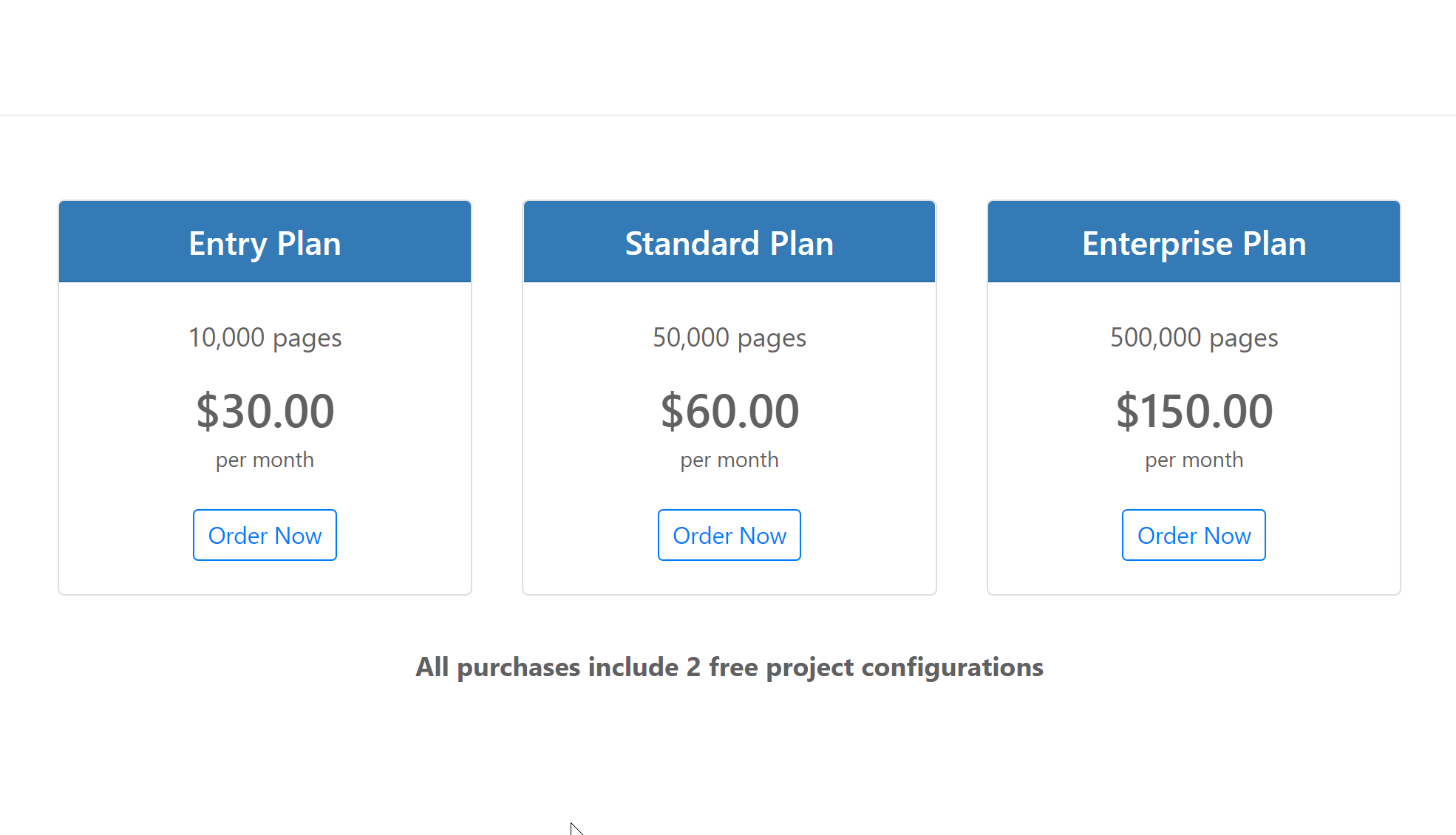
As per pricing, Web Content Extractor is very economical and can be purchased by anyone who needs web scraping services.
Entry Plan
If you want to use it lightly, for example around 1,000 pages per month, you should choose the Entry Plan.
- Cost: $30 per month
- Pages allowed: 10,000 pages
Standard Plan
If you are a medium user and need to crawl around 50,000 pages per month, the Standard Plan is suitable.
- Cost: $60 per month
- Pages allowed: 50,000 pages
Enterprise Plan
If you have very high scraping needs and require more than 50,000 pages, the Enterprise Plan is recommended.
- Cost: $150 per month
- Pages allowed: 500,000 pages
They also provide web scraping services and offer the first two agents for free with every plan.
You have the flexibility to scrape conservatively or at scale.
As per the pricing, it is very economical and can be bought by anyone in need of its services.
How to do Web Scraping using this platform
If you are wondering about the usage of this online version, you don’t have to worry. I prepared small-basic steps, it scraps data from a very simple 1-level depth of data from the Playground Example – Detail Page With Hyper Link, let’s get to it.
- First of all, go to http://www.webcontentextractor.com/
- Then scroll down to see “Get started with a free account”.
- Make an account if you don’talready have already.
- Once logged in, click on New Project. A new Window will open where you can enter the project name and click on create to get a window like this.
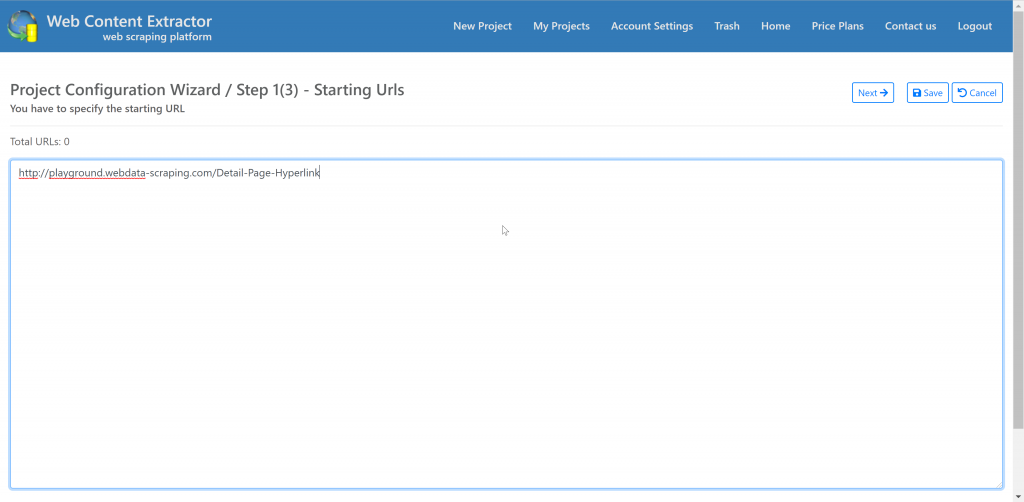
- Enter your start URL or list of start URLs in to next step
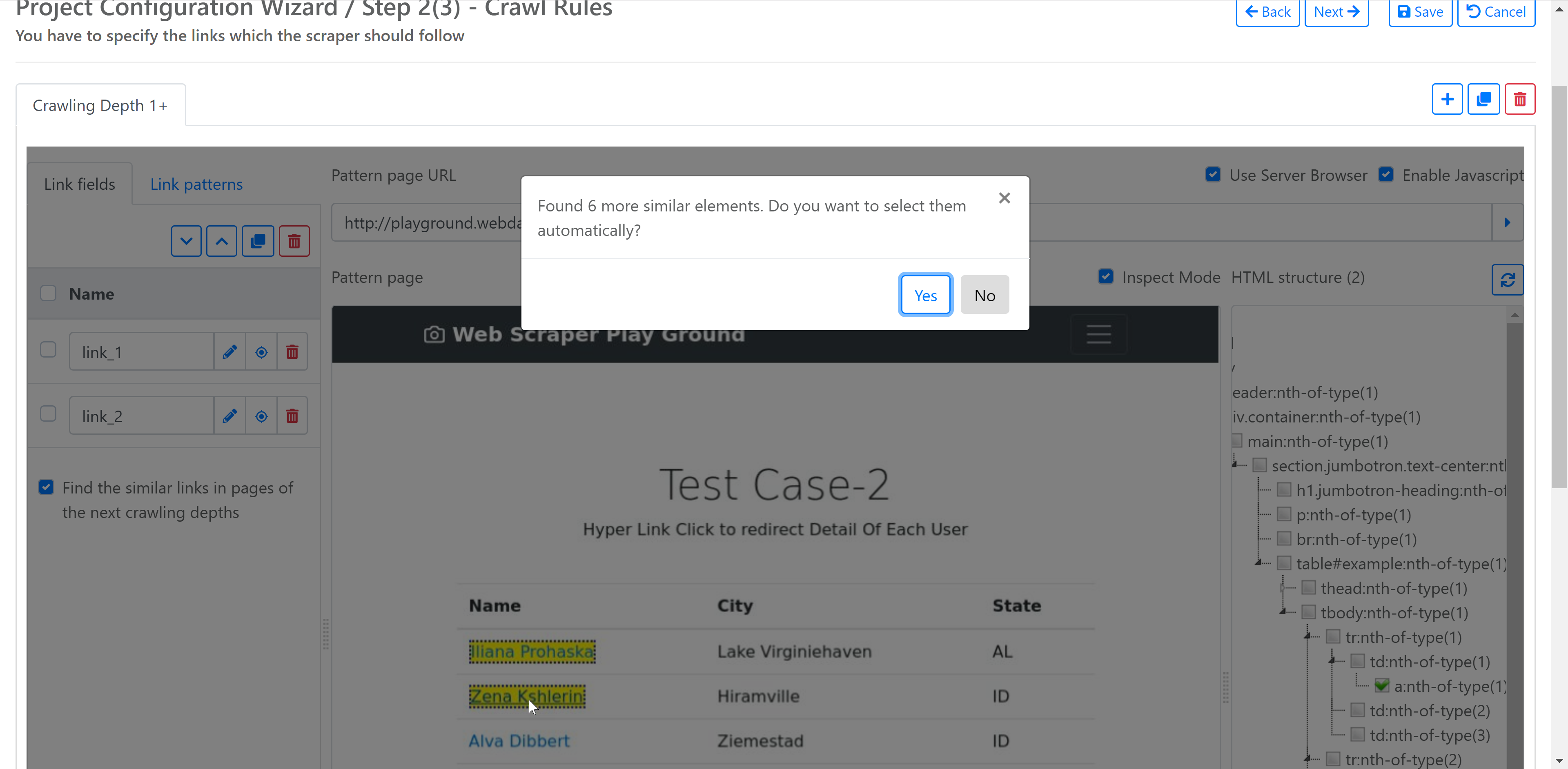
Once you enter the URL and click on the “Next” button, you will see the layout as shown in the screenshot, where you can define the Crawling/Navigation Pattern and Depth. You can use a point-and-click interface to highlight the likable links that the scraper needs to crawl repeatedly.
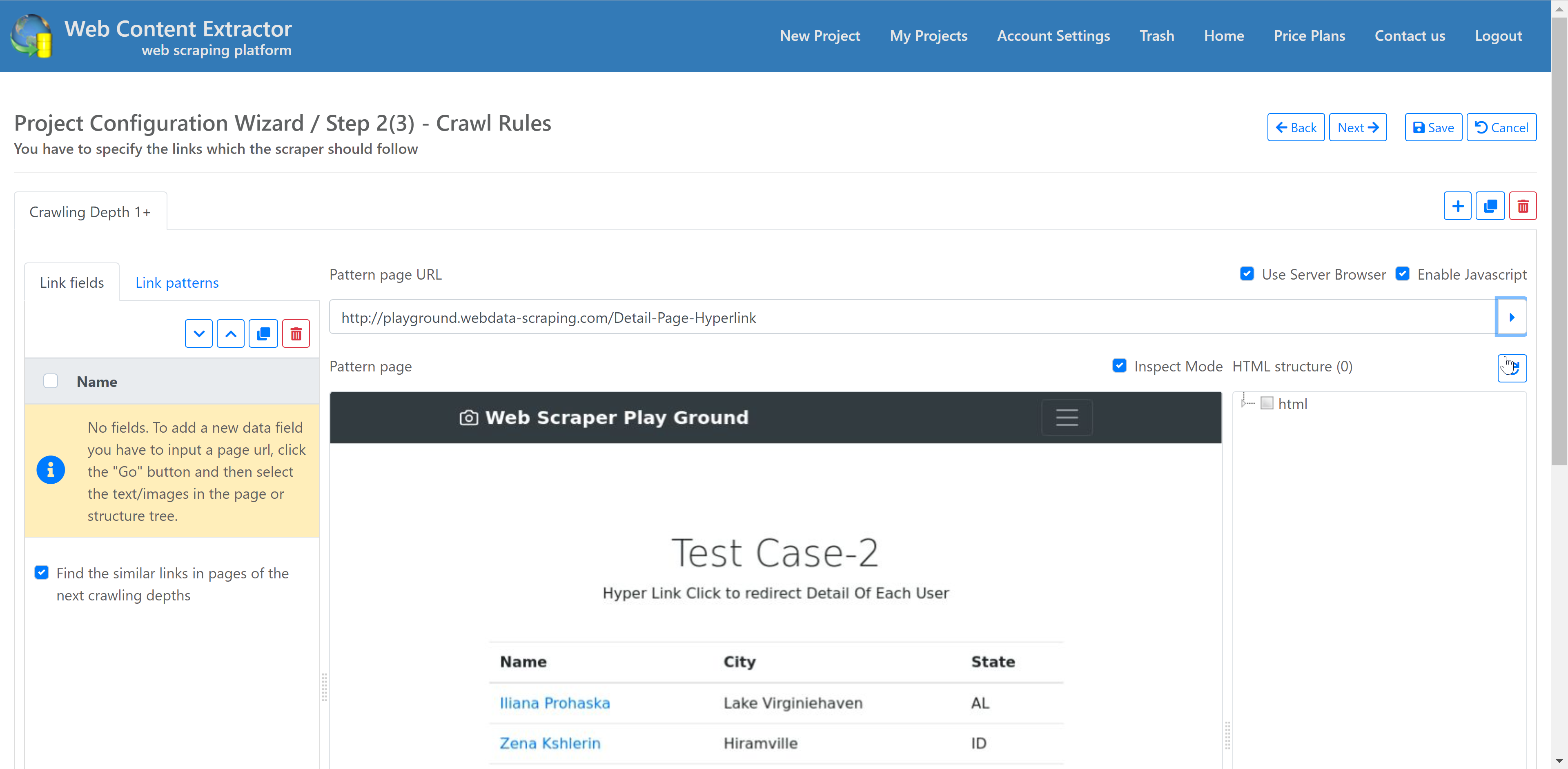
In our case, we only have one level of depth, so we choose clickable links of profile names, and when we select two similar links, the platform automatically detects and prompts us to crawl all similar links.
After defining the crawling pattern, it’s time to define data fields that need to be scraped from the profile page, as shown in the screenshot. We can selecta specific element on the browser and name it.
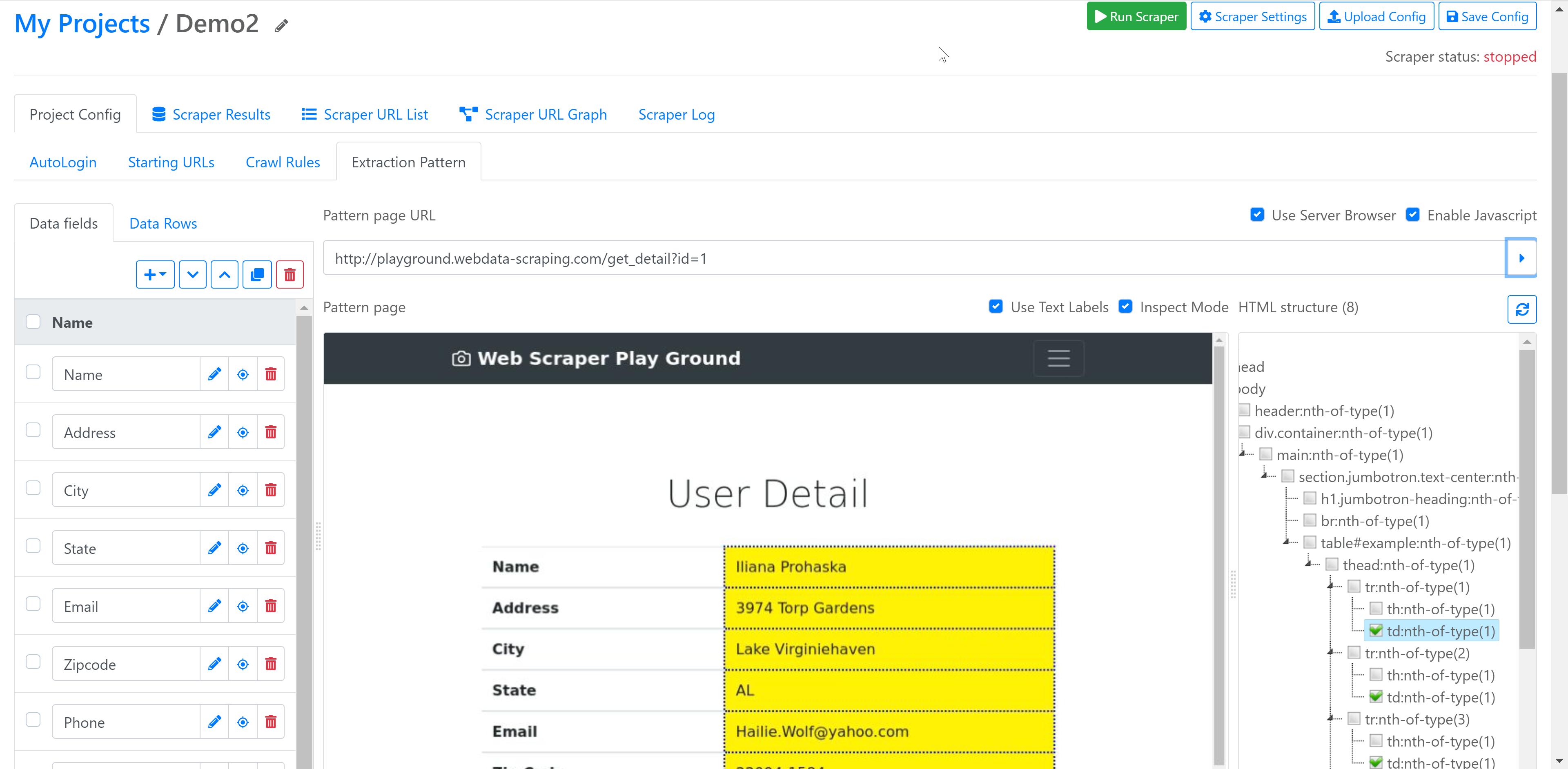
Here we have defined fields like Name, Address, City, State, Email, Zipcode, Phone, URL and Timestamp. On the Left side you can see list of defined fields and on right side it shows HTML tree view of DOM elements of that page.
This platform also provides basic transformation functionality, When you define a field or by editing existing field you can use inbuilt transformation functions like below
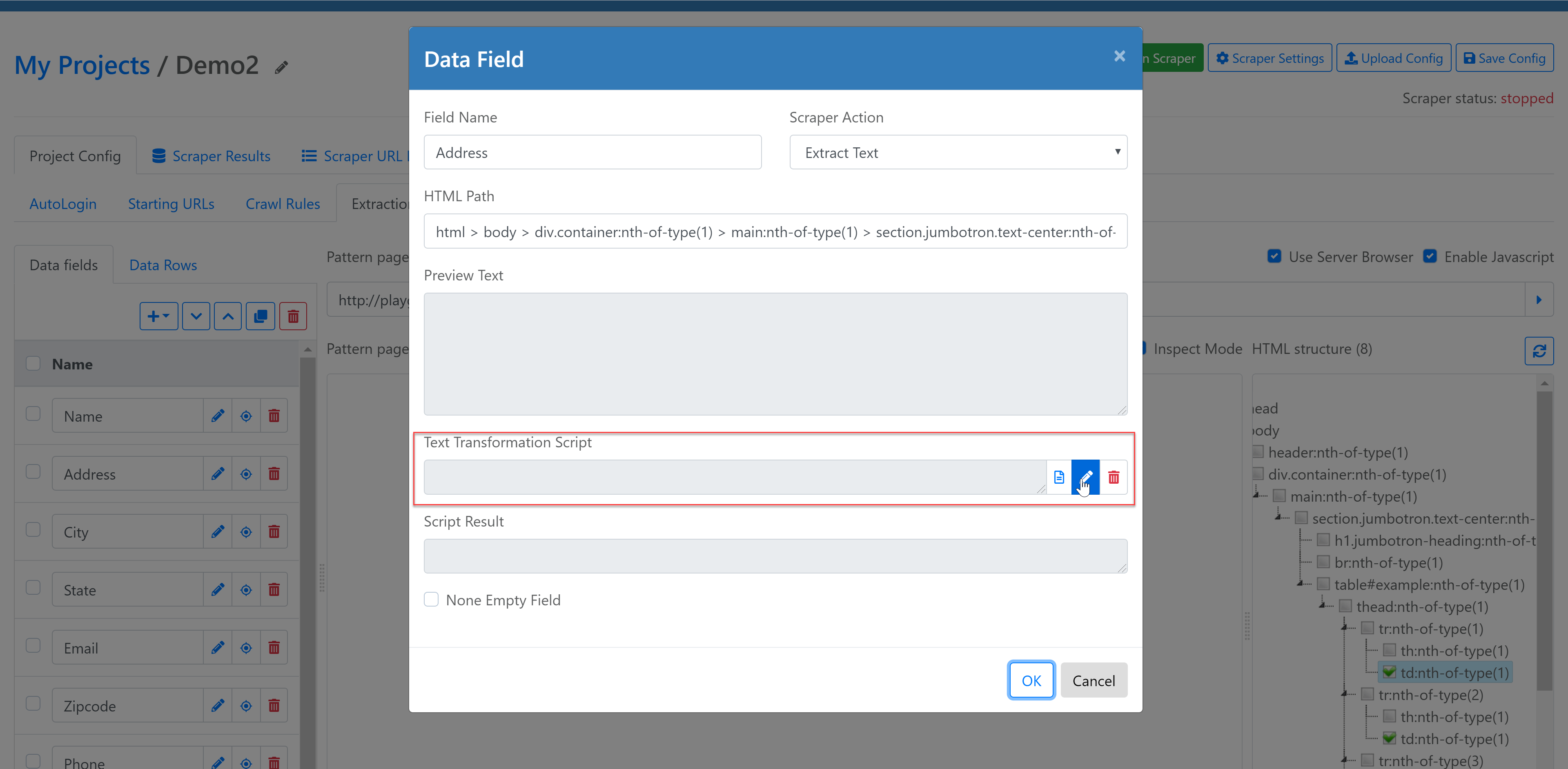
- Add String at the Beginning:
This function adds string at the beginning of a specific string. - Add String at the End:
This function adds string to the end of a specific string. - Extract Email:
Extract email addresses from a specific string using pattern matching (a regular expression). - Extract Phone:
Extract phone numbers from a specific string using pattern matching (a regular expression). - Left String:
Extracts string from left. - Replace String:
Replace the sub-string specified in the find What parameter with the sub string specified in the second replace With parameter. - Replace String Regex:
Replace all strings that match a regular expression pattern with a specified replacement string. The pattern parameter specifies the pattern of an expression. The replacement is the replacement string. - Right String:
Extract string from right. - Split String:
Extracts string from the text. - Strip HTML:
This function removes all html tags from a specific string. - Sub String:
Extracts part of string (sub string) from whole string. - Sub String RegEx:
Extract the sub-string from a specific string using regular expression (Regex). - Trim String:
Remove white-space, tab and line break characters on both sides of a string.
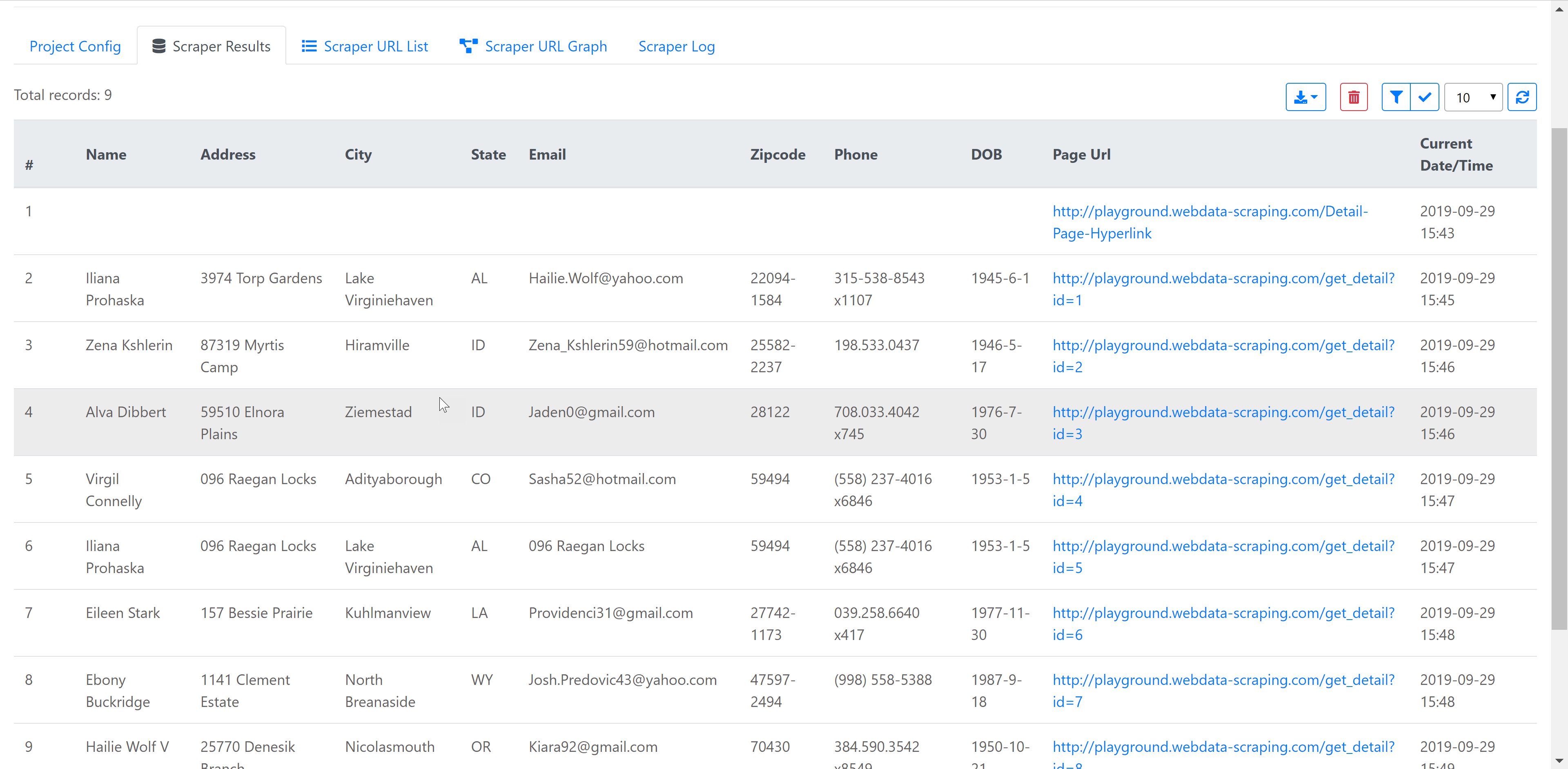
Now it’s time to execute the agent we have created, You can click on “Run Scraper” green button on top and now relax the scraper will run and extract data. Below is the screenshot of extracted data from this simple scraping agent. You can download extracted data in CSV and JSON format.
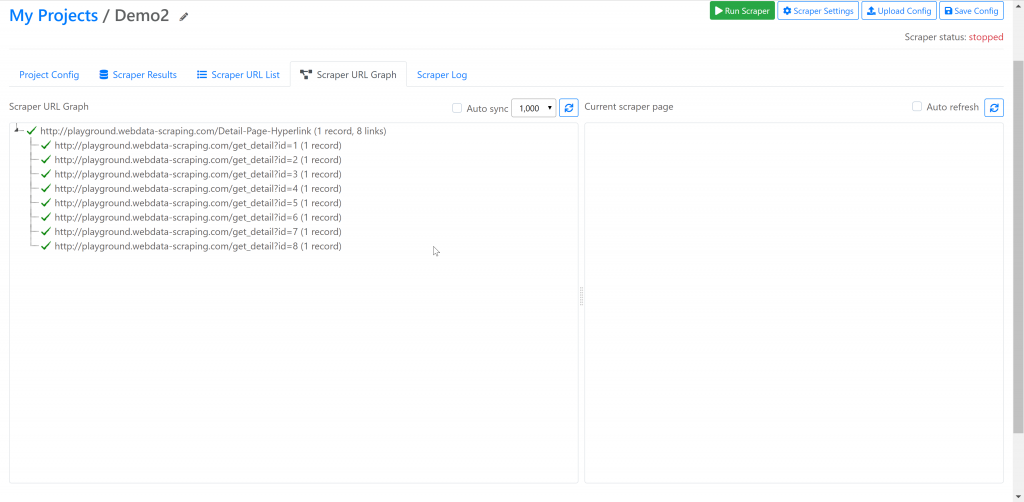
Platform also provides Log Tab where you can view log of the scraper and it also has Scraper URL Graph tab which shows the list of URLs scraper crawled and shows whether it’s successfully executed and got 200 OK response of it failed.
Conclusion:
Overall, Web Content Extractor Online has made data scraping very easy. Even a beginner can use it to extract data without any difficulty.
No coding is required. All you need is basic browser knowledge and the ability to follow simple steps.
However, this platform is more suitable for simple data extraction jobs. It does not offer advanced features like conditional flow, JavaScript-based custom interaction, CAPTCHA solving, or advanced JSON and XML parsing.
Still, for avoiding manual effort and saving time on tedious data extraction tasks, Web Content Extractor is a very useful tool.
