What is ETL?
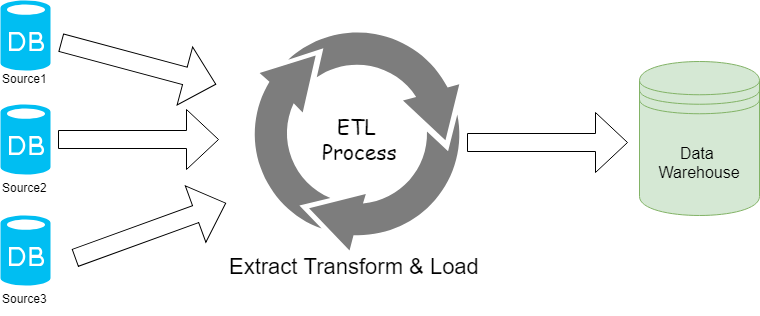
Extract, Transform, Load (ETL) is the process of extracting data from various data sources, organizing it together, and storing it into a single database for later use like decision making and business insights. Before people used to perform ETL through manual coding in SQL or .NET, but today lots of ETL tools are available that simplify the process. ETL is generally used for data migration, data replication, operational processes, data transformation and data synchronization.
Extract
Extract is the first step in the ETL process and the most important step. Data is saved in various formats like in row text file, Excel or CSV files, RDMS database or in JSON or XML files. This process allows to read those different data sources and pass it to the next process which is Transform.
Transform
This second step transforms data into required format, it includes various operations on data such as Joining, Sorting, Filtering, Type Conversion, Lookups, Validating and other data operations and these steps make data prepared for the next step.
Load
In this last step the processed data get loaded to final destination which can be raw file, can be saved in Excel or CSV or also can be loaded in to database system like MySQL, Access or PostgreSQL and many other available options.
ETL Tools and Software
There are many ETL tools available in market both commercial as well as open source like Informatica Power Center, IBM Infosphere Information Server, Oracle Data Integrator, Microsoft SQL Server Integrated Services(SSIS), Ab Initio, Sybase ETL and many more.
ETL has a big role in web scraping process. Data scraped from Public websites or other sources are not always in well format or some time it’s messy, ETL tools like Talend and other tools helps to transform the data in required format, validate them, merge them and load it to database like MySQL, NoSQL, sqLite, Oracle and many others or storage target like Amazon S3, FTP, Azure, Dropbox and others.
Talend Open Studio
Talend is one of the best free open source ETL tools available in this era of big data. Talend easily integrates various types of data sources, including CSV, spreadsheets, databases and almost all cloud-based or on-premise Data warehouse solutions. Talend makes the task of the data warehouse developer easy and fun experience. Talend has extended functionalities for data cleansing, data profiling, Enterprise Application Integration (EAI), Big Data, Data Quality and Master data management.
Some of the key features of Talend:
- Free open source Community version, hence enhanced flexibility
- It is widely used for data integration.
- It has More than 900 inbuilt components for connecting various data sources.
- It provides easy to use Drag and drop graphical user interface.
- It can be easily deployed to single cloud or multi cloud or hybrid cloud environment.
- Community Support: Community.Talend.com is Talend’s technical community site. Sections available for users include a support forum, a wiki, bugtracker, components, tutorials and the translation tool.
Here is a real use case example of merging multiple excel files using Talend which is very easy and straight forward. If this has to do manually then take lot of human hours or to do code in other language to achieve same.
Download Talend:
Download Talend Open Source Integration Studio from Download Link and start developing your ETL process.
Advantages of using ETL Tools:
- ETL tools are more robust and reliable than writing custom code for achieving ETL processes as these tools are tested and refined from many development cycles.
- Drag and Drop interface allows you to solve problems in hours. Time saving and Cost saving.
- ETL tools are highly tuned for performance optimization so they work very fast.
- Using this tool Large dataset integration can be done while doing the same with legacy old ways can lead to failure of job completion.
- ETL tool provides better debugging and error handling mechanisms.
- Jobs developed with ETL tools can be easily shared between developers and increase reusability as all have a common knowledge base about ETL tools.
- Most ETL tools provide ways to create builds that can be deployed on cloud and executed with little or no configuration change on target environment.
Merge files, having the same schema
Let’s take an example job where you have data in many excel sheets and you want to merge them into one single file.
Primary Components Used in this Job are below:
tFileListis used to merge the data of multiple files having the same schema and same file mask in a single file or in a Database using Talend Open Studio for Data Integration.
tFlowToIteratewill process the files one by one.
tlterateToFlowwill store the data till all the files are processed and data from all those files has been fetched.
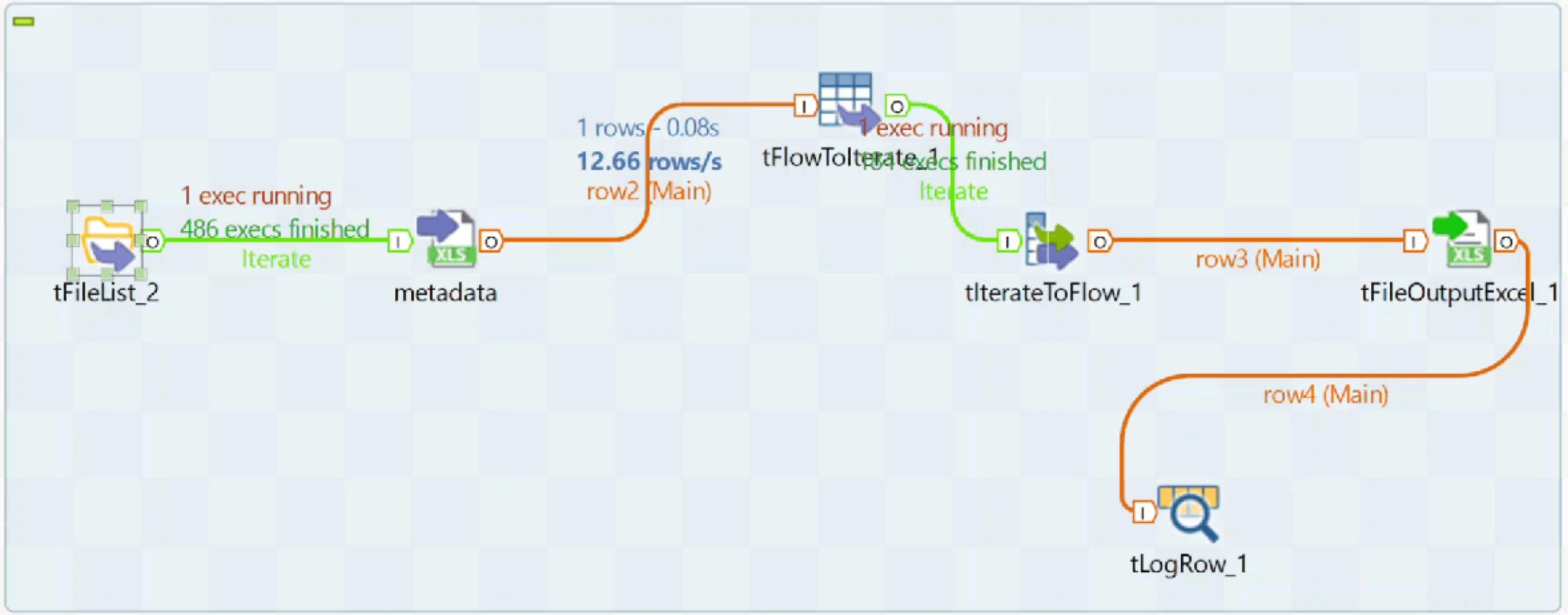
There were 2000 Excel files having 10 columns in each Excel file, and that required to be merged into one big Excel file for data analysis. This job assumes that all the files have the same schema structure. Once the job finishes, it generates one big file with all the data.
If there are multiple files having different schemas and you want to merge them into one, then you need to use the tMap component to normalize data into a similar format and then applythe merge process on it.
I will be writing some more articles and publishing more video tutorials for Talend in the near future.
