 Fminer is one of the powerful web scraping software, I already given brief of all the Fminer features in previous post. In this post I am going to introduce one of the interesting feature of fminer which is Run Code Template that is recently added to Fminer, this feature is similar to “Fminer Run Code” action but it’s different in a way you can use it.
Where to Use Run Code Action
The Run Code Action you can use inside the data scraping flow and python code get executed when the scraper starts running.
Run Code Templates are the saved python code snippets that you can run on the data tables after scraping completes. Assume if you get white space in scraped data then you can easily trim this left and right spaces by just executing “strip_column” template, see the code of that template below.
Template Code
'''Strip all data of a column in data table
Remove the blank of data in the head and the tail.
'''

tabName = '[%table1|data table%]'
colName = '[%table1.column1|table column for strip%]'

tab = tables[tabName]
for i, row in enumerate(tab):
    row[colName] = row[colName].strip()
    tab.edit_row(i, row)
This template comes with Fminer and a few other templates, like “merge_tables_with_same_columns”.
Step-by-Step Process for Executing Template Python Code
Below are the steps on how you can execute template Python code on scraped data.
Step 1: Click on the second icon from the right that says “Run Code” under the Data section
Step 2: One pop-up will appear, you need to click on the “Templates” icon and choose the template you want to execute,e and then click on Ok.
Step 3: Now the window will appear for configuration that will ask you to choose the table and column under that table on which you want to execute the code. Now click on Ok again.
Step 4: Now you can see the code of that template. You can click on the execute icon and the script will start running. Based on the number of records, it will take time to finish execution.
Warning: Before running the script on your scraped data, take a backup so if something goes wrong, you have a backup of data; otherwise, you have to scrape it again.
In many web scraping projects, I found this template code very handy for cleaning data and making life easy. Templates are stored at the following path, so you can create your own template with customized code.
C:\Program Files (x86)\FMiner\templates
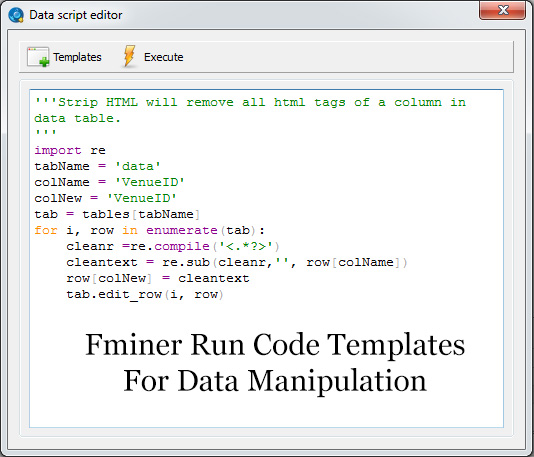
I have created a template that I use to remove HTML code that comes from badly organized HTML pages. Below is the code of a template for stripping HTML:
'''Strip HTML will remove all html tags of a column in data table.
'''
import re
tabName = '[%table1|data table%]'
colName = '[%table1.column1|table column for substring%]'
colNew = '[%table1.column1|table column to add new data%]'
tab = tables[tabName]
for i, row in enumerate(tab):
    cleanr =re.compile('<.*?>')
    cleantext = re.sub(cleanr,'', row[colName])
    row[colNew] = cleantext
    tab.edit_row(i, row)
Stay connected, as I am going to post more code templates that will make your web scraping life easy and manipulate data on the fly.
