
You might downloaded a large amount of images or PDFs while doing web scraping of e-commerce store products, blog posts, and in many other cases. Most web scraping tool provides file downloading either in CSV, vcf, images (JPG, JPEG, GIF, PNG), pdf or other kinds of files, but many of them do not provide a way to rename them or add an extension to them if it’s not present.
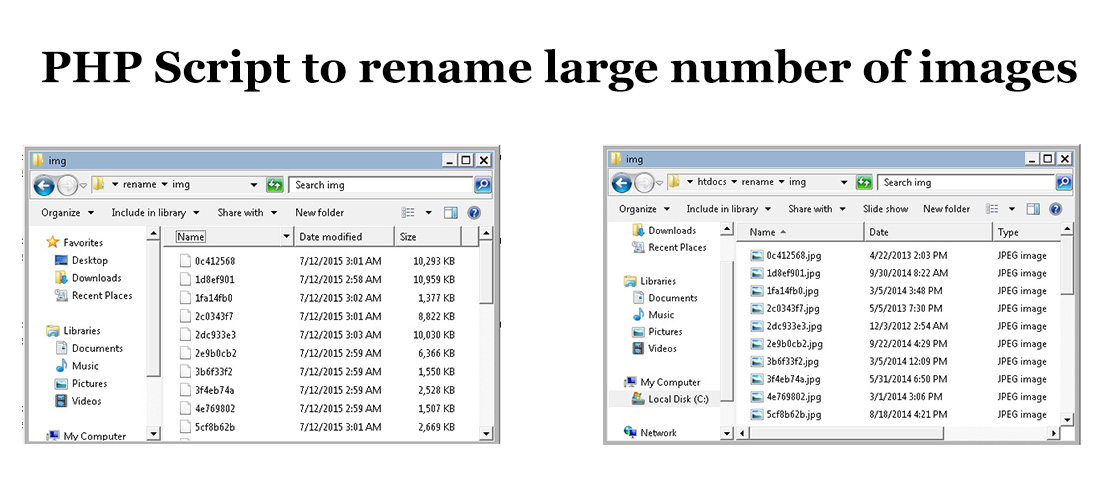
I have encountered a problem, especially with image files – many websites have images, but they do not have the extension, and web scraper just downloads files as it is, as an example given below, they are the file names downloaded using web scrape,r but they don’t have extension .jpg or .png!!
0c412568
1d8ef901
1fa14fb0
2c0343f7
These files do not have extensions like .jpg or .png, making them difficult to open or manage.
Solution: PHP Script to Rename Files and Add Extensions in Bulk
Once all files are downloaded, renaming them manually is time-consuming. To solve this problem, I created a simple PHP script that renames all files in a folder and adds a file extension.
<?php

$dir = "img"; //folder which has all downloaded images

if (is_dir($dir)) {
    if ($dh = opendir($dir)) {
        while (($file = readdir($dh)) !== false) {
            echo "Renaming file:".$dir."/".$file."<br />";
			  $file_name_old=$dir."/".$file;
			  $file_name_new = $file.".jpg"; //adding extension to file
			rename($file_name_old, $dir."/".$file_name_new);
        }
        closedir($dh);
    }
}

?>
This script renames all files inside the /img folder and adds the .jpg extension to each file.
Use Cases and Customization
You can use this script to rename any type of file, including images, PDFs, CSVs, VCFs, or Excel files. If you want to bulk rename images using SEO-friendly filenames, you can slightly modify the script to replace spaces with hyphens or apply custom naming rules.
