Being one of the largest home improvement retailers online, The Home Depot has become a go-to source for tools, appliances, building materials, and seasonal products. Many developers and researchers want to collect this data for pricing analysis, product research, or inventory tracking, but are unsure how to do it.
So, how do you scrape product details from The Home Depot? What tools do you need? And how do you handle things like pagination and structure?
We’ve covered all of that in this step-by-step tutorial. You’ll learn how to extract accurate product information using a reliable and repeatable method.
Alright then, let’s dive in
What We’ll Scrape From The Home Depot
Before we get into how to extract data from HomeDepot.com, let’s first look at the kind of product information we’re aiming to collect.
Each product listing on the site contains a set of key details that are useful for pricing analysis, catalog building, or competitive research for vendors working with Home Depot. Here’s what we’ll be targeting:
- Item ID – A unique identifier assigned to each product
- Brand Name – The manufacturer or brand label, such as Milwaukee
- Model Number – Helpful for matching items across marketplaces
- Product Title – The name used in listings and search results
- Product URL – The direct path to the product detail page
- Price – The listed selling price and any original price if discounted
- Average Rating – Based on customer feedback
- Total Number of Reviews – Total review count for the product
- Image URL – The main product image hosted by Home Depot
How to Find The Home Depot’s GraphQL Endpoint
Home Depot uses a GraphQL-based API to serve product search results. Instead of scraping HTML pages, the better approach is to send requests directly to this endpoint. It returns clean, structured JSON that’s easier to work with and more stable across layout changes.
To access this data, we’ll capture the network request made by the site when a user performs a product search.
Step 1: Search for a Product on HomeDepot.com
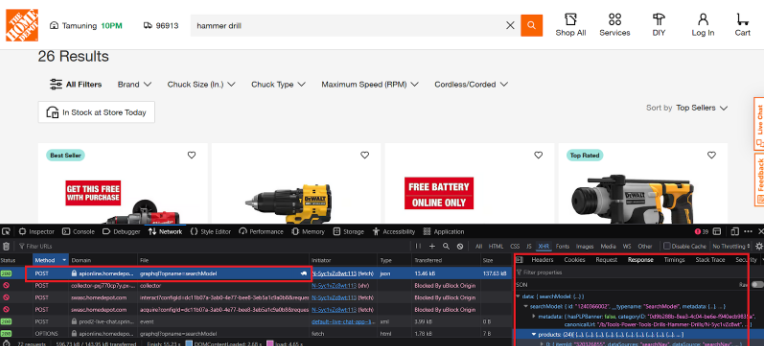
Start by visiting homedepot.com and entering any keyword into the search bar. This could be a tool name like “hammer drill.”
Step 2: Open Developer Tools and Inspect Network Activity
- Open your browser’s Developer Tools (press F12 or right-click > Inspect)
- Go to the Network tab
- Reload the page or perform the search again
- Filter requests by Fetch/XHR
- Look for a POST request to this URL: https://apionline.homedepot.com/federation-gateway/graphql?opname=searchModel
This is the internal endpoint used by Home Depot to return product data from search results. We will use it to scrape the Home Depot search engine results.
Step 3: Inspect the Request Payload
Click on the request and go to the Payload tab. You’ll see three main parts:
- “operationName”: “searchModel”
- “variables“: contains search keyword, store ID, pagination values, and sorting method
- “query“: the actual GraphQL query used to retrieve results
This request is what powers Home Depot’s on-site product listings. It returns the full list of products shown in the search results, including metadata like brand, model number, price, and image.
Step 4: Fields Returned in the Response
The JSON response includes a list of products with fields such as:
- itemId
- brandName and modelNumber
- productLabel and canonicalUrl
- pricing value and pricing.original
- averageRating and totalReviews
- images.url
You can replicate this request in Python using the same endpoint, headers, and query body.
Scraping Home Depot Product Data Using Python
Now that we’ve located the GraphQL endpoint, let’s go through a working Python script that extracts product data from HomeDepot.com using structured requests.
Instead of parsing HTML, this script uses the searchModel GraphQL operation to return clean JSON.
To get started:
- Make sure Python 3 is installed on your system
- Install the requests module using: pip install requests
- If needed, add your Home Depot session cookie to the COOKIE field in the script
- Run the script in your terminal or Python environment.
1. Set Up Search Parameters and Output Settings
import requests
import json
import time

KEYWORD = "hammer drill"
NUM_PAGES = 2
PAGE_SIZE = 24
DELAY = 1  # seconds
COOKIE = ""  # ← Paste your cookie here if needed
OUTPUT_FILE = f"{KEYWORD}_products.json"
These are your input settings.
- KEYWORD is the search term used on Home Depot.
- NUM_PAGES defines how many pages of products to scrape.
- PAGE_SIZE sets how many products per page (24 is Home Depot’s default).
- DELAY helps avoid bot detection by spacing out requests.
- COOKIE can be added if Home Depot blocks unauthenticated access.
- OUTPUT_FILE is the name of the output file.
2. Define Request Headers for GraphQL Calls
headers = {
    "Host": "apionline.homedepot.com",
    "User-Agent": "Mozilla/5.0 (Windows NT 10.0; Win64; x64; rv:138.0) Gecko/20100101 Firefox/138.0",
    "Accept": "*/*",
    "Accept-Language": "en-US,en;q=0.5",
    "Accept-Encoding": "gzip, deflate, br, zstd",
    "Referer": "https://www.homedepot.com/",
    "Content-Type": "application/json",
    "Origin": "https://www.homedepot.com",
    "DNT": "1",
    "Sec-GPC": "1",
    "Connection": "keep-alive",
    "x-experience-name": "general-merchandise",
    "x-hd-dc": "origin",
    "x-debug": "false"
}

if COOKIE:
    headers["Cookie"] = COOKIE
These headers make your request look like a normal browser. Adding a valid cookie (if needed) helps avoid request blocks.
3. Prepare the GraphQL Query for Product Data
graphql_query = """
query searchModel(
  $storeId: String,
  $startIndex: Int,
  $pageSize: Int,
  $orderBy: ProductSort,
  $filter: ProductFilter,
  $isBrandPricingPolicyCompliant: Boolean,
  $keyword: String,
  $navParam: String,
  $storefilter: StoreFilter = ALL,
  $channel: Channel = DESKTOP,
  $additionalSearchParams: AdditionalParams
) {
  searchModel(
    keyword: $keyword,
    navParam: $navParam,
    storefilter: $storefilter,
    isBrandPricingPolicyCompliant: $isBrandPricingPolicyCompliant,
    storeId: $storeId,
    channel: $channel,
    additionalSearchParams: $additionalSearchParams
  ) {
    products(startIndex: $startIndex, pageSize: $pageSize, orderBy: $orderBy, filter: $filter) {
      itemId
      identifiers {
        brandName
        modelNumber
        canonicalUrl
        productLabel
      }
      pricing(storeId: $storeId, isBrandPricingPolicyCompliant: $isBrandPricingPolicyCompliant) {
        value
        original
      }
      reviews {
        ratingsReviews {
          averageRating
          totalReviews
        }
      }
      media {
        images {
          url
        }
      }
    }
  }
}
"""
This defines the GraphQL query used in the request. It asks for specific fields: item ID, brand, model number, price, rating, and images.
4. Send a POST Request to the GraphQL Endpoint
def fetch_page(keyword, start=0, page_size=24):
    url = "https://apionline.homedepot.com/federation-gateway/graphql?opname=searchModel"
    payload = {
        "operationName": "searchModel",
        "variables": {
            "skipInstallServices": False,
            "skipFavoriteCount": False,
            "storefilter": "ALL",
            "channel": "DESKTOP",
            "skipDiscoveryZones": False,
            "skipBuyitagain": True,
            "additionalSearchParams": {
                "deliveryZip": "96913",
                "multiStoreIds": []
            },
            "filter": {},
            "isBrandPricingPolicyCompliant": False,
            "keyword": keyword,
            "navParam": None,
            "orderBy": {
                "field": "BEST_MATCH",
                "order": "ASC"
            },
            "pageSize": page_size,
            "startIndex": start,
            "storeId": "1710"
        },
        "query": graphql_query
    }

    response = requests.post(url, headers=headers, json=payload)

    if response.status_code != 200:
        print(f"[HTTP {response.status_code}] Blocked or failed.")
        try:
            print("Server response:", response.json())
        except:
            print(response.text)
        raise Exception(f"Request failed with status: {response.status_code}")

    return response.json()
This function sends a POST request to the endpoint using your keyword and page settings. It builds the request payload with the search keyword and GraphQL query. This way it builds a scraper for the Home Depot search sorting.
If successful, it returns a parsed JSON response.
5. Collect and Paginate Results Across Multiple Pages
def collect_products(keyword, pages=5, page_size=24, delay=1):
    all_products = []

    for i in range(0, pages * page_size, page_size):
        page_num = i // page_size + 1
        print(f"Scraping page: {page_num}")
        try:
            data = fetch_page(keyword, start=i, page_size=page_size)

            if "data" not in data or "searchModel" not in data["data"]:
                print("Unexpected response structure")
                print(json.dumps(data, indent=2)[:1000])
                raise Exception("'data.searchModel' not found")

            products = data["data"]["searchModel"]["products"]
            all_products.extend(products)
            time.sleep(delay)

        except Exception as e:
            print(f"Failed page {page_num}: {e}")
This function loops through multiple pages of results. It calculates the correct startIndex for each page, fetches the results, and appends them to a master list.
time.sleep(delay) adds a pause between requests to reduce the risk of being blocked.
6. Save the Scraped Product Data to a JSON File
print(f"\nTotal products scraped: {len(all_products)}")
    with open(OUTPUT_FILE, "w", encoding="utf-8") as f:
        json.dump(all_products, f, indent=2, ensure_ascii=False)
    print(f"Saved all data to {OUTPUT_FILE}")


collect_products(KEYWORD, pages=NUM_PAGES, page_size=PAGE_SIZE, delay=DELAY)
After collecting all pages, the script writes everything to a .json file using the keyword as the filename prefix.
This is how json response would look like:
{
    "itemId": "301688589",
    "identifiers": {
      "brandName": "Milwaukee",
      "modelNumber": "48-22-9022",
      "canonicalUrl": "/p/Milwaukee-22-oz-Milled-Face-Framing-Hammer-48-22-9022/301688589",
      "productLabel": "22 oz. Milled Face Framing Hammer"
    },
    "pricing": {
      "value": 31.97,
      "original": 31.97
    },
    "reviews": {
      "ratingsReviews": {
        "averageRating": "4.6808",
        "totalReviews": "1156"
      }
    },
    "media": {
      "images": [
        {
          "url": "https://images.thdstatic.com/productImages/2baa69e3-ed22-4235-be24-0d538d07cfb3/svn/milwaukee-framing-hammers-48-22-9022-64_.jpg"
        }
      ]
    }
  },
  {
    "itemId": "313022809",
    "identifiers": {
      "brandName": "Husky",
      "modelNumber": "N-A20P15HK",
      "canonicalUrl": "/p/Husky-20-oz-Steel-Rip-Hammer-and-15-in-Wrecking-Bar-N-A20P15HK/313022809",
      "productLabel": "20 oz. Steel Rip Hammer and 15 in. Wrecking Bar"
    },
    "pricing": {
      "value": 16.88,
      "original": 16.88
    },
    "reviews": {
      "ratingsReviews": {
        "averageRating": "4.7783",
        "totalReviews": "203"
      }
    },
    "media": {
      "images": [
        {
          "url": "https://images.thdstatic.com/productImages/16faa374-4673-4601-9a93-6e4437ebec6f/svn/husky-claw-hammers-n-a20p15hk-64_.jpg"
        },
        {
          "url": "https://images.thdstatic.com/productImages/cd9c2212-b41d-4c29-a8bf-13e8caabf7b1/svn/husky-claw-hammers-n-a20p15hk-e4_.jpg"
        }
      ]
    }
  }
Code Limitations
The script depends on Home Depot’s current JSON structure and internal API. Any changes to the GraphQL schema or request pattern may cause it to fail.
It does not include built-in handling for CAPTCHAs, rate limits, or advanced bot detection. After repeated use, the endpoint may stop responding or return errors.
High request volume without proxy management can lead to IP blocks or throttled responses.
Want Home Depot Data Without Managing Scripts?
The Python script works well for small-scale scraping, but keeping it running over time takes effort. Any change in Home Depot’s structure or detection systems can break it.
If you need accurate product data from HomeDepot.com, including categories, prices, reviews, and availability, we can take care of it for you.
At WebData-Scraping, we deliver structured product data at scale without requiring you to manage code, proxies, or site changes.
Contact us. We’ll handle the rest.
