
Do you want to get data from a web page or website to CSV or Excel Spreadsheet? The Solution is web scraping. There are a number of
Official Website:web scraping software and services available in the market, such as Import.io, Diffbot, ScrapingBee, Apify, and Bright Data. However, most of these tools are paid and can be complex for non-technical users.
In this post, I’ll introduce an alternative method of web scraping that’s both user-friendly and free. Several Google Chrome browser extensions, available on the Chrome Web Store, make screen scraping/web scraping simple and accessible, even for beginners.
Web scraper
Official Website:
webscraper.io
Install it by visiting the following link:
Web Scraper Chrome Extension

Web Scraper is one of the most popular Chrome extensions for structured data extraction. It uses a visual sitemap builder, letting you click through a website and specify which data to scrape — perfect for users who want more control without writing code.
Best for: Developers, research teams, and enterprises
Features:
• Supports JavaScript-heavy and dynamic websites
• Cloud scraping and scheduling (with paid plan)
• Exports data in CSV, JSON, and XLSX formats
Pricing: Free with optional Pro plan (~$50/month)
Data Miner
Official Website: Dataminer.ioo
Install it by visiting the following link: Web Data Miner Chrome Extension
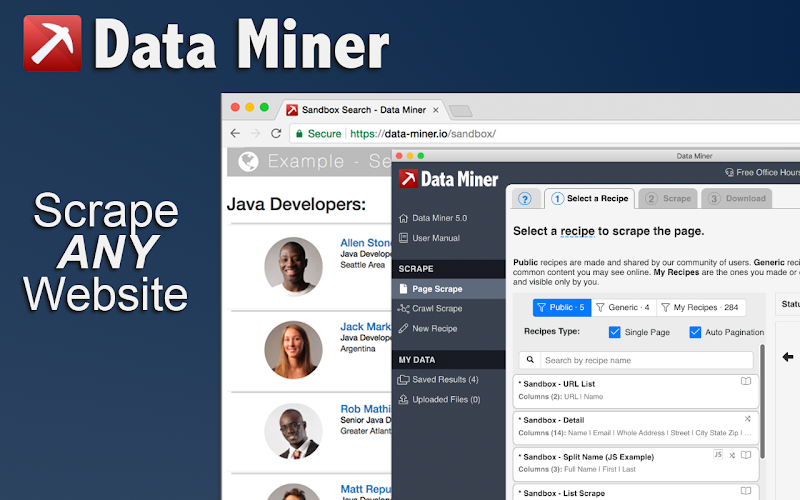
Data Miner is a feature-rich extension offering both manual and pre-built scraping recipes. Its large recipe library makes it a go-to for marketers, data analysts, and researchers looking to collect structured data with minimal setup.
Best for: Analysts, marketers, and academic researchers
Features:
• 60,000+ ready-made scraping recipes
• Exports to Excel, CSV, and Google Sheets
• Automation and scheduling in paid plans
Pricing: Free with optional Pro plan (~$50/month)
Instant Data Scrape
Install it by visiting the following link: Instant Data Scraper Chrome Extension
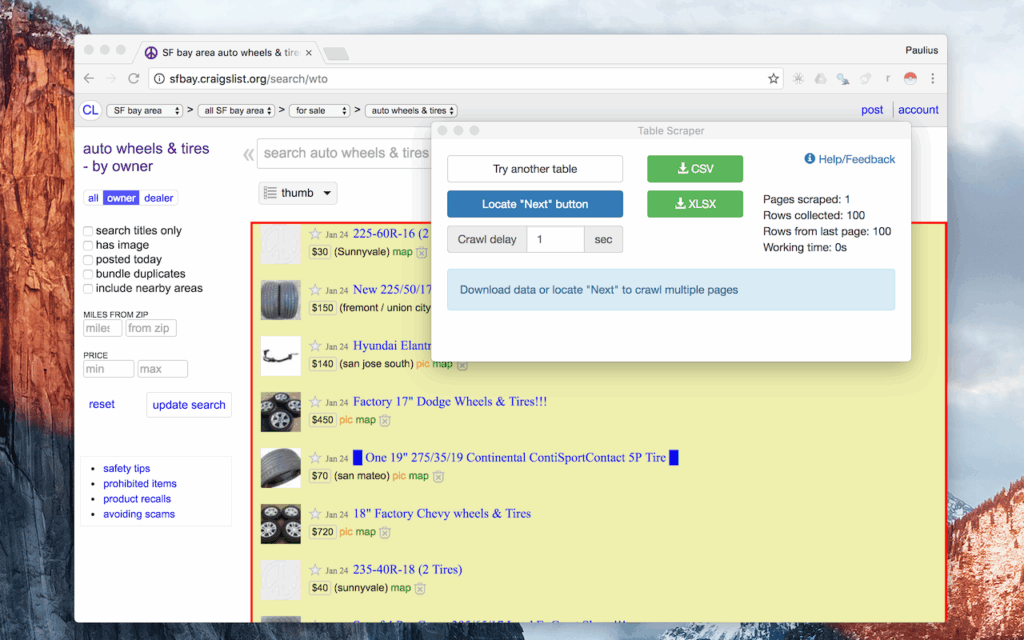
Instant Data Scraper is the easiest tool for anyone new to scraping. It automatically detects patterns and tabular data on pages without needing configuration. Ideal for quick tasks like grabbing product lists or directories.
Best for: Beginners, casual users
Features:
• Auto-detects tables and data structures
• One-click export to CSV/Excel
• No setup or coding needed
Pricing: 100% free
Pline
Official Website: Pline.ai
Install it by visiting the following link: Pline Chrome Extension
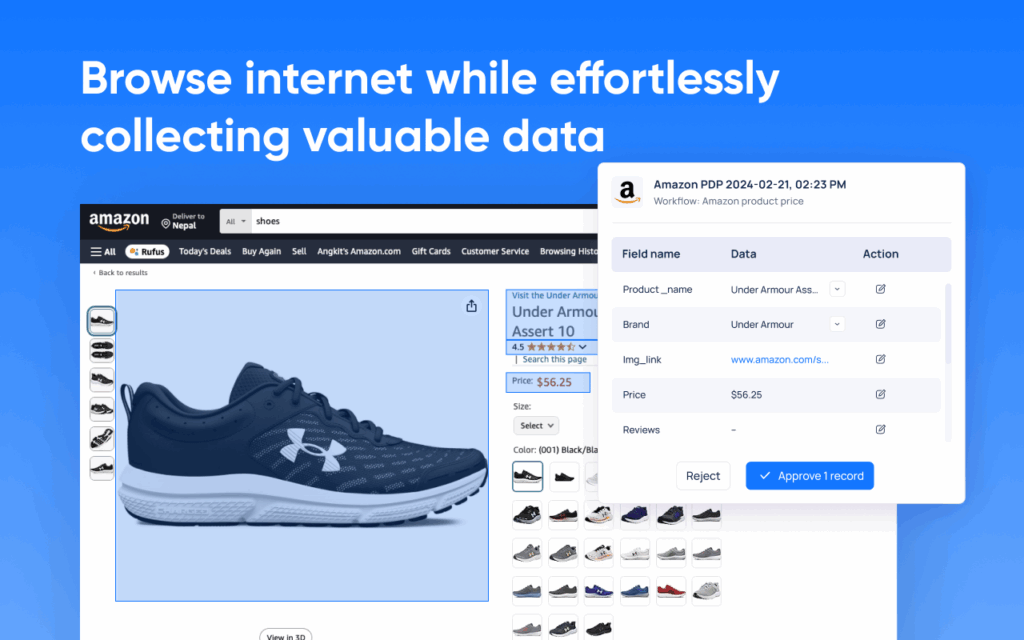
Pline is a lightweight tool that focuses on simplicity and speed. While it lacks support for dynamic content or cloud scraping, it’s great for extracting small data sets or for personal use.
Best for: Hobbyists and students
Features:
• Basic scraping functionality
• Easy CSV export
• Lightweight and fast
Pricing: Completely free
Agenty
Official Website: Agenty.com
Install it by visiting the following link: Agenty Chrome Extension
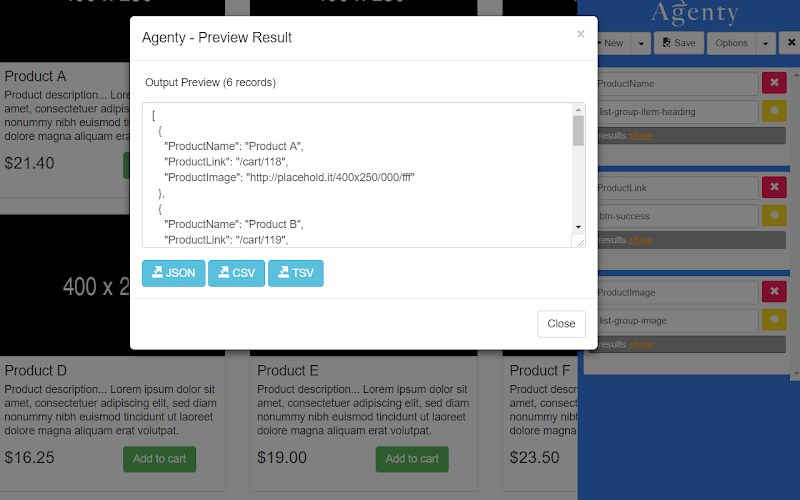
Agenty is a professional-grade scraping tool built for scalability. It supports both point-and-click scraping and cloud execution with scheduling and API access. Although it has a learning curve, it’s ideal for large-scale or recurring projects.
Best for: SaaS platforms, tech teams, and heavy users
Features:
• Supports AJAX and dynamic pages
• Integration with cloud and external APIs
• Export in JSON, CSV, XML
Pricing: Trial available; paid plans start at $29/month
How to Install Chrome Extensions
Before using any scraping tools, it’s important to ensure you’re installing Chrome extensions safely and correctly. Here’s how to do it:
-
Install from Official Sources Only:
Always download extensions directly from the Chrome Web Store to minimize the risk of malware or malicious code. -
Review Permissions Carefully:
Before installing, Chrome displays the permissions an extension needs. If the requested access feels excessive (e.g., control over all your site data), reconsider the installation. -
Check User Reviews and Ratings:
Favor extensions with high ratings, positive feedback, and recent updates — these usually indicate reliability and ongoing developer support. You can browse reviews on the Chrome Web Store to gauge trustworthiness. -
Keep Extensions Updated:
Chrome auto-updates extensions, but you can manually check by visiting chrome://extensions. Staying updated ensures you receive the latest features and security patches. -
Remove What You Don’t Use:
Uninstall or disable any scraping tools you’re not actively using. This helps reduce security risks and keeps your browser environment streamlined.
By following these best practices, you can confidently and securely take advantage of Chrome scraping extensions.
Common Use Cases for Chrome Scrapers
Web scraping isn’t just for techies. Chrome scraper extensions open up data collection possibilities for everyone. Here are some popular use cases:
- E-commerce: Extracting product names, prices, and stock levels from retail websites.
- Real Estate: Collecting property listings, prices, and agent information from real estate portals.
- Academic Research: Gathering data from published journals, articles, or conference websites.
- Job Hunting: Scraping job titles, company names, and locations from career sites.
- Lead Generation: Harvesting emails, business details, and contact info from business directories.
- Event Planning: Compiling event schedules, speaker bios, and ticket prices from conference sites.
These tools save hours of manual copy-pasting, and make large data collection projects manageable.
Web Scraping Etiquette: Staying Legal and Respectful Online
- Respect Website Terms of Service:Not all websites allow scraping. Always check their Terms of Use.
- Avoid Overloading Servers: Set scraping speed to reasonable levels to avoid causing strain or getting IP-banned.
- Data Accuracy: Dynamic websites may load content differently, leading to missing or incomplete data if not configured properly.
- Personal Data: Be careful when scraping sites with user-generated content to avoid accidentally collecting sensitive information.
Using scrapers responsibly ensures long-term usability and avoids legal trouble.
- Respect Website Terms of Service:Not all websites allow scraping. Always check their Terms of Use.
- Avoid Overloading Servers: Set scraping speed to reasonable levels to avoid causing strain or getting IP-banned.
- Data Accuracy: Dynamic websites may load content differently, leading to missing or incomplete data if not configured properly.
- Personal Data: Be careful when scraping sites with user-generated content to avoid accidentally collecting sensitive information.
Using scrapers responsibly ensures long-term usability and avoids legal trouble.
Summary Table: Web Scraper Extension Comparison
| Feature / Extension | Web Scraper | Data Miner | Agenty | Instant Data Scraper | Pline |
|---|---|---|---|---|---|
| Availability | ✅ Active | ✅ Active | ✅ Active | ✅ Active | ✅ Active |
| Ease of Use | ⭐⭐⭐⭐☆ | ⭐⭐⭐⭐☆ | ⭐⭐⭐☆☆ | ⭐⭐⭐⭐⭐ | ⭐⭐⭐⭐☆ |
| Dynamic Support | ✅ Yes | ✅ Yes | ✅ Yes | ⚠️ Partial (AJAX) | ❌ No |
| Pagination Handling | ✅ Yes | ✅ Yes | ✅ Yes | ✅ Yes | ❌ No |
| Cloud Scraping | ✅ (Pro) | ❌ No | ✅ Yes | ❌ No | ❌ No |
| Scheduling | ✅ (Cloud) | ✅ (Pro+) | ✅ Yes | ❌ No | ❌ No |
| Export Formats | CSV, JSON, XLSX | CSV, Excel, Google Sheets | JSON, CSV | CSV, XLSX | CSV |
| Templates | ❌ No | ✅ Yes | ❌ No | ❌ No | ❌ No |
| AI Detection | ❌ No | ⚠️ Limited | ❌ No | ✅ Yes | ⚠️ Partial |
| Free Plan | ✅ Yes | ✅ Limited | ✅ Trial | ✅ Fully free | ✅ Free |
| Paid Plan Start | ~$50/mo | ~$19/mo | ~$29/mo | N/A | N/A |
WebData-Scraping: Custom Web Scraping Solutions
Chrome scraping tools are great for quick wins — grabbing product lists, tables, or search results without much setup. But what if the site is complicated, has logins, or you need thousands of rows updated regularly?
That’s where we come in.
At WebData-Scraping ,we help businesses, researchers, and teams extract data from the web — no coding, no hassle. Just tell us what you need, and we’ll build a custom solution that fits.
Here’s what we offer:
- Custom scraping, tailored to you: Whether it’s a small blog or a complex portal, we handle it.
- Any format you want: CSV, Excel, Google Sheets, JSON, API — you name it.
- No technical headaches: We set it up, keep it running, and handle the tricky stuff.
- Trusted by professionals: Used by teams in e-commerce, real estate, research, and more.
So if you’ve outgrown browser extensions or just want someone to take care of it all for you — reach out to us . We’d love to help you get the data you need, the way you need it.
Conclusion
Chrome extensions make web scraping easier and more accessible than ever. Whether you need quick data grabs or complex structured scraping, there’s a tool for every skill level — and many are free to start.
Pick the right extension based on your needs, scrape responsibly, and start unlocking valuable data with just a few clicks.
