
API stands for Application Programming Interface, which is a software intermediary that allows two applications to communicate with each other. In the web scraping ecosystem, an API defines the correct way for a web developer to programmatically manage and control a Content Grabber agent. It works like a Program API that uses Remote Procedure Call (RPC) to access and interact with scraping components efficiently from external applications.
What Is Content Grabber Programming Interface
The Content Grabber programming interface (API) provides access to the Content Grabber run-time from your own web/desktop applications. For example, if you want to access the result of the Content Grabber Agent in your web application and display it on the dashboard, you can do it easily using the Content Grabber API.
The Content Grabber run-time can be distributed with your applications royalty-free and does not require the Content Grabber application to be installed on the target computer. The Content Grabber run-time requires .NET version 4.5 or higher.
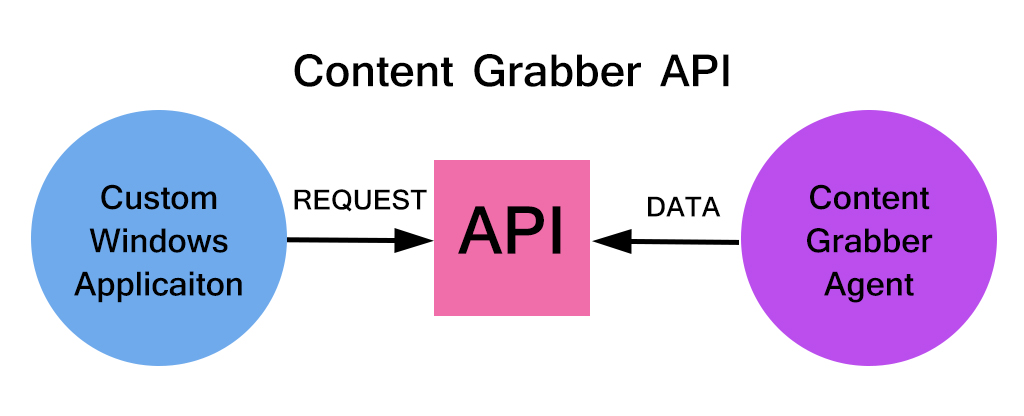
Controlling Content Grabber Agent from Web Applications
Consider a situation in which you want to control the Content Grabber Agent from a web application. You can do it with Content Grabber Proxy API. Meaning that you can easily control the agent and access extracted data from a non-Windows environment, like from an ASP.NET Web Application or from a Python web scraping module on a Linux Server.
Standalone Agents vs Content Grabber API
Content Grabber allows building standalone agents that can be distributed royalty-free and run without requiring the full Content Grabber application on the target computer. However standalone agents have some limitations, like a standard user interface, and data can be exported to only file formats. If you want to design your own interface and export data to other formats other than provided by the standalone agent, the Content Grabber API is the option.
-
Accessing Content Grabber Agent in Windows Application:
1.1. Configure Visual Studio: You just need to add the following references to your project to use the Content Grabber API: 1) AgentApi.dll and 2) AgentProxy.dll
1.2. The Content Grabber run-time files can be generated in the Content Grabber application by choosing Run-time Package in the Application menu. This will generate a zip file with all required files and folders. Copy-Paste these files and folders into your BIN folder.
-
Accessing Content Grabber Agent in Web Application:
One can use the Content Grabber API in web applications using the Content Grabber agent service. It is basically a Windows service that can be used to run agents. Your web app interacts with the Windows service using a small proxy assembly that requires no special security privileges and depends on no other files.
You just need to add the proxy assembly to your web application’s assembly references and use the proxy to call the API functions. The proxy can only execute agents, not load agents.
Limitations of Content Grabber API:
- You can not alter the Agent Command Structure using the API
- You can not change the Agent in a way that would possibly affect the output data structure of the Agent.
- You can not perform Add, Delete, Move, or Copy commands on the Agent
- You can not change the Disabled and Export command properties
Some useful functionalities of the Content Grabber Web Scraping API
#1. Enable/Disable Content Grabber API:
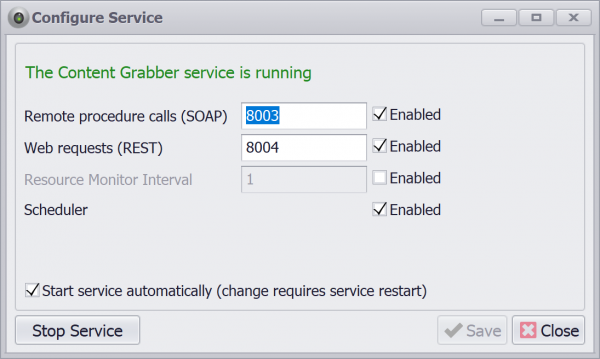
Web scraper can enable/disable Content Grabber API functionalities by using Configure Service Option. It has the following configuration options:
- Enable/Disable Remote Procedure Calls(SOAP) and set SOAP port
- Enable/Disable REST API and set REST API port
- Enable/Disable Resource Monitor and its interval
- Enable Disable Service Scheduler
- Enabling/disabling of service auto start
#2. Use case: Product Scraping API
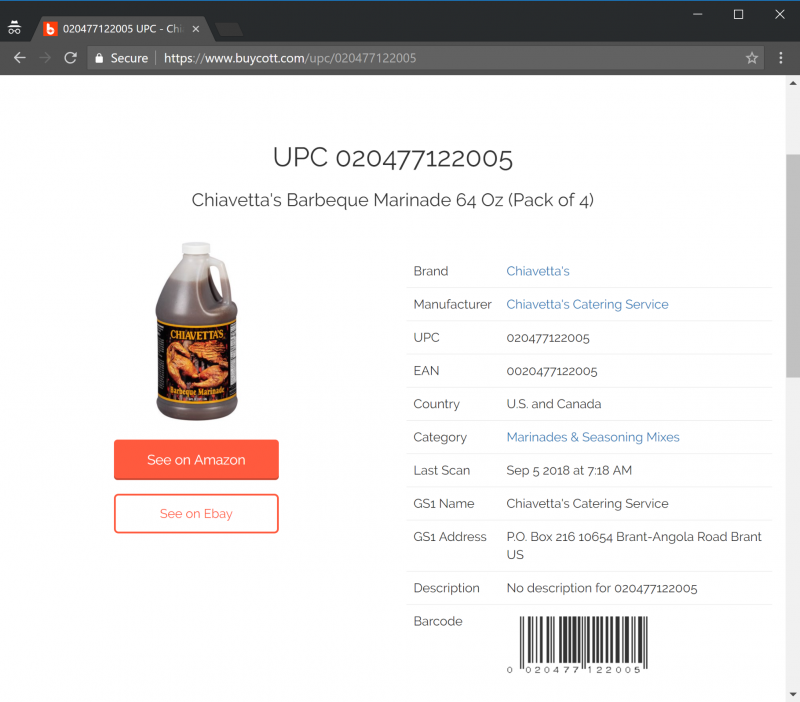
Let us assume a case where we want to search and scrape product data for product information based on the provided Barcode/UPC number. In this case, we can develop an API using Content Grabber that takes a barcode/UPC as input and returns JSON data as output.
The Content Grabber Windows service supports simple web requests, so you can run agents and retrieve scraped data from non-Windows environments, such as from a Python script or PHP page on a Linux server.
RunAgentReturnJson is the method name and it has one mandatory argument “agent” which denotes the name of the agent which we are going to call. You can pass additional parameters along with request. In the this example UPC_SEARCH_API is the name of the agent and expects UPC as the input.
http://localhost:8004/ContentGrabber/RunAgentReturnJson?agent=UPC_SEARCH_API&pars={"upc":"020477122005"}
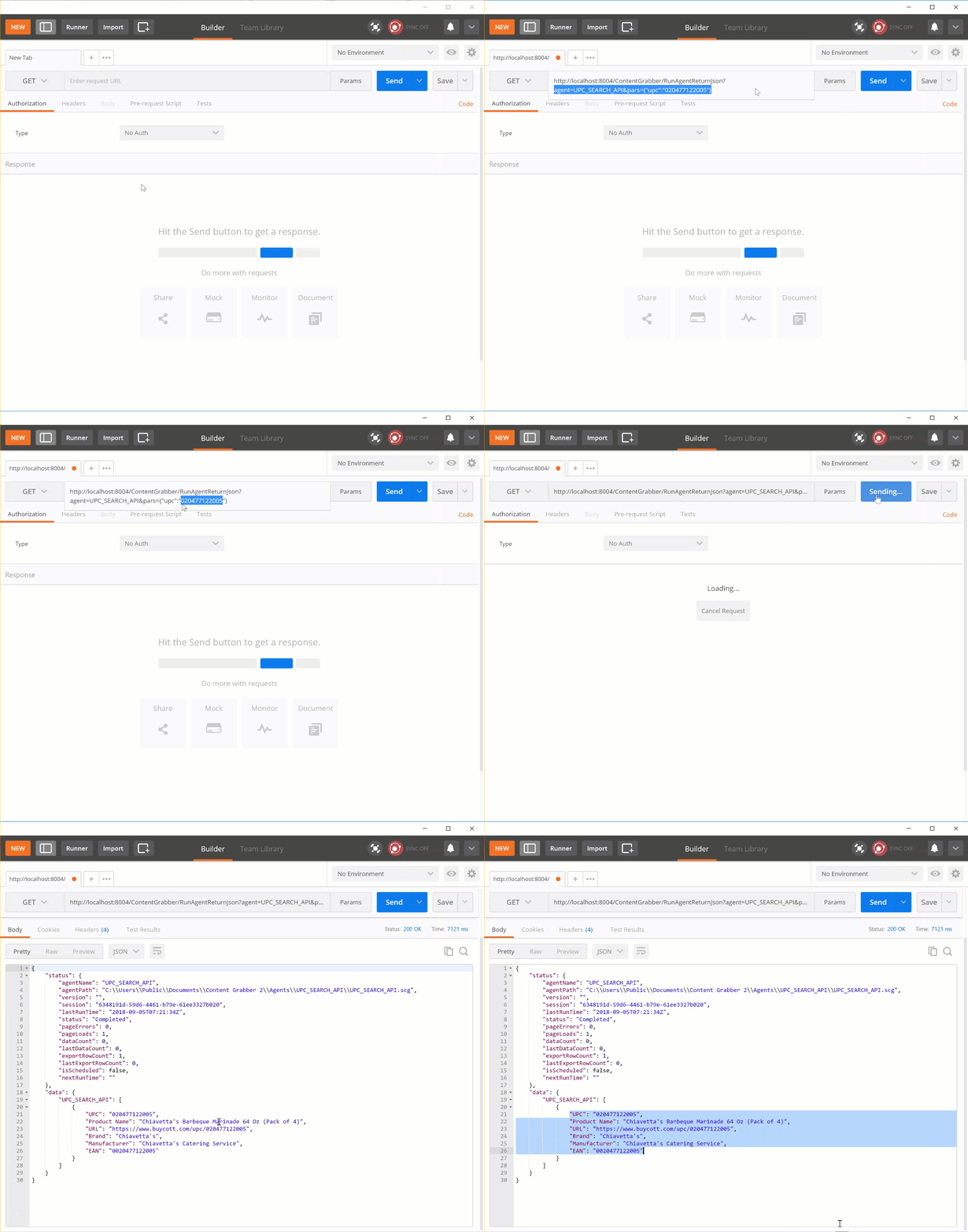
The above API endpoint executes the Content Grabber agent synchronously and returns the scraped product information as a JSON string as given below
{
    "status": {
        "agentName": "UPC_SEARCH_API",
        "agentPath": "C:\\Users\\Public\\Documents\\Content Grabber 2\\Agents\\UPC_SEARCH_API\\UPC_SEARCH_API.scg",
        "version": "",
        "session": "6348191d-59d6-4461-b79e-61ee3327b020",
        "lastRunTime": "2018-09-05T07:21:34Z",
        "status": "Completed",
        "pageErrors": 0,
        "pageLoads": 1,
        "dataCount": 0,
        "lastDataCount": 0,
        "exportRowCount": 1,
        "lastExportRowCount": 0,
        "isScheduled": false,
        "nextRunTime": ""
    },
    "data": {
        "UPC_SEARCH_API": [
            {
                "UPC": "020477122005",
                "Product Name": "Chiavetta's Barbeque Marinade 64 Oz (Pack of 4)",
                "URL": "https://www.buycott.com/upc/020477122005",
                "Brand": "Chiavetta's",
                "Manufacturer": "Chiavetta's Catering Service",
                "EAN": "0020477122005"
            }
        ]
    }
}
