Introduction
Fminer is a powerful web scraping tool as well as the best browser automation tool that supports many features that web scraping software needs. Some of the Fminer’s key features are Support of Multithreading, Captcha solving feature, setting actions to deal with browser automation like Input text into the text field, selecting options from the drop-down, choosing radio buttons and checkboxes, project scheduling and email feature, custom Proxy support and many more. You can read details on each feature of Fminer in my previous post Fminer – Visual Web Scraping Software With Macro Recorder and Diagram Designer.
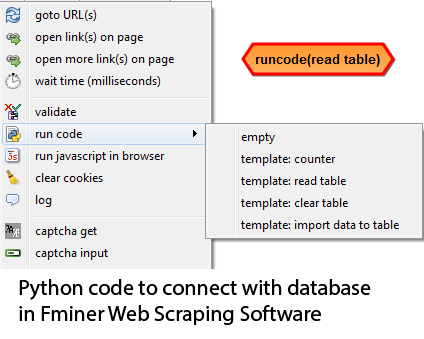
In this post, I am going to shed some light on one of the compelling features of Fminer which is called “Run Code action”. Using this feature, one can run custom Python code to manipulate scraped data, to upload scraped data directly into MySQL or SQL server from Fminer, and you can do any tricky thing using Python code you can write.
Most web scrapers do not have this feature using which you can use to put your code in the scraping workflow for data manipulation, to control the scraping process, or for any other tricky work. Some of the data extraction software that has this feature are Visual Web Ripper and Fminer. I am sharing Python code you can use inside Fminer and connect it with MySQL or SQL Server.
Python code to read data from the MySQL database and insert it into the Fminer table
 import sys
import pyodbc
table1=tables['student']
connection_str ="""Driver={MySQL ODBC 5.3 ANSI Driver};Server=localhost;
Database=student;User=root; Password=;Option=3;"""
cnxn = pyodbc.connect(connection_str)
cnxn.autocommit = True
cursor=cnxn.cursor()
sql="""select name from students"""
cursor.execute(sql)
rows=cursor.fetchall()
for row in rows:
r=[{'name':row.name}]
table1.add_rows(r)
tables.update_ui()
cursor.close()
del cursor
cnxn.close()
import sys
import pyodbc
table1 = tables['keywords']
connection_str ="""Driver={SQL Server Native Client 11.0};Server=SR1\SQLEXPRESS;
Database=dbname;Trusted_Connection=yes;"""
db_connection = pyodbc.connect(connection_str)
db_connection.autocommit = True
db_cursor = db_connection.cursor()
sql_command="""select * from search_keywords"""
db_cursor.execute(sql_command)
rows = db_cursor.fetchall()
for row in rows:
    	v=row.keyword
	    row = [{'key': v}]
	    table1.add_rows(row)
db_cursor.close()
del db_cursor
db_connection.close()
Conclusion
Both of the above codes read data from a database table in either MySQL or SQL server and insert it into the Fminer table and then Fminer can use it further based on the scraping workflow you designed.
You can also use the table run code template and add database code into it with insert into query when you want to save scraped data back to database. There are many web scraping scenarios where you can utilize this code. For example you have list of keywords available in database and you want to search for that keyword on some website and then scrape data based on that keyword regularly and want to save scraped data back to the database so in that case you just need to schedule Fminer to scrape and all scraping and saving back to the database goes smooth way.

Comments are closed.