
If you’re looking for the best Python web scraper to extract product data like titles, prices, or SKUs from Overstock.com, your first instinct might be to use tools like BeautifulSoup or Selenium. While those can work, they rely on scraping raw HTML, which is slow and fragile.
A better alternative is using a Python web scraping library like requests to pull data from Overstock’s hidden API. This approach is faster, more stable, and returns clean JSON, perfect for developers, analysts, and automation teams.
If you’re looking to dive deeper into tools, anti-bot strategies, and broader e-commerce scraping methods, don’t miss our The Complete E-commerce Web Scraping Guide for 2025.
In this blog, you’ll learn step-by-step how to find Overstock’s hidden API, send requests using Python, and export product data to CSV or JSON.
What Is Overstock and Why Use Python to Scrape Overstock Products?
Overstock.com is a major U.S. retailer offering thousands of products, especially furniture and home décor. With such a vast and frequently updated catalog, it’s ideal for data monitoring, whether for pricing, inventory, or competitor analysis.
Scraping Overstock with a Python web scraping library allows you to automate data collection with precision. However, HTML scraping methods are often unreliable. Instead, using Overstock’s hidden APIs provides a faster and more reliable solution.
What Are Hidden APIs and Why Use Them for Python Web Scraping?
Hidden APIs are internal API endpoints used by websites to load content dynamically behind the scenes, often using JavaScript’s fetch() or XMLHttpRequest. These endpoints return data in clean, structured JSON instead of HTML.
For instance, when you search for “chairs” on Overstock, the site doesn’t reload the entire page. Instead, it triggers a background request like: https://www.overstock.com/search.js?view=json&q=chairs
This endpoint returns the full product list in JSON format, making your scraper fast, reliable, and much easier to manage.
Now that you understand what hidden APIs are, let’s see why using them is better than scraping HTML.
Why the Best Python Web Scraper Uses GET Requests for Overstock
Scraping HTML using tools like BeautifulSoup or Selenium means analyzing the structure of a fully loaded web page. This process is often slow, prone to errors, and easily broken by small changes in the page layout.
Hidden APIs, on the other hand, return clean, structured JSON data, making your scraper faster and more reliable.
Here’s a quick comparison:
| Criteria | Hidden APIs | HTML Scraping (BeautifulSoup/Selenium) |
|---|---|---|
| Data Format | Returns structured JSON data | Extracts raw HTML (requires parsing and cleaning) |
| Speed & Performance | Fast: Fetches only the data you need via lightweight API calls | Slower: Loads full page, often includes CSS, JS, and media assets |
| Stability | More stable: APIs rarely change unless backend logic changes | Fragile: Small UI or class name changes can break the scraper |
| Ease of Parsing | Easy: Clean key-value pairs in JSON format | Harder: Requires locating elements by tag, class, or XPath |
| Code Complexity | Cleaner and shorter Python code | More verbose, with conditional parsing logic |
| Use Cases | Ideal for scraping product catalogs, APIs, dashboards | Necessary for legacy sites or where no API exists |
How to Find Overstock’s Hidden API Using Chrome DevTools
To scrape from Overstock using hidden APIs, you first need to locate the actual endpoint the site uses to fetch products. Chrome DevTools is the best tool for this.
Step-by-Step Guide:
1. Open the Overstock Website
Visit Overstock.com and search for a product — e.g., “chairs”.
2. Open Chrome DevTools
Press F12 or right-click → Inspect → go to the Network tab.
3. Filter by XHR or Fetch Requests
Click on the XHR filter to see all API calls happening in the background
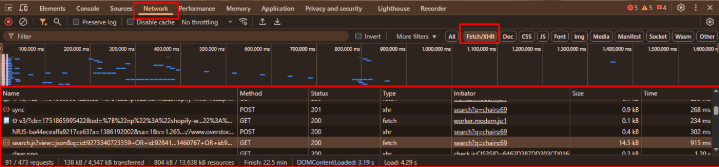
4. Perform a Search or Scroll to Trigger Requests
If you haven’t already, type a search term (like “chairs”) into the Overstock search bar and hit Enter. This triggers several background API calls to fetch the product results.
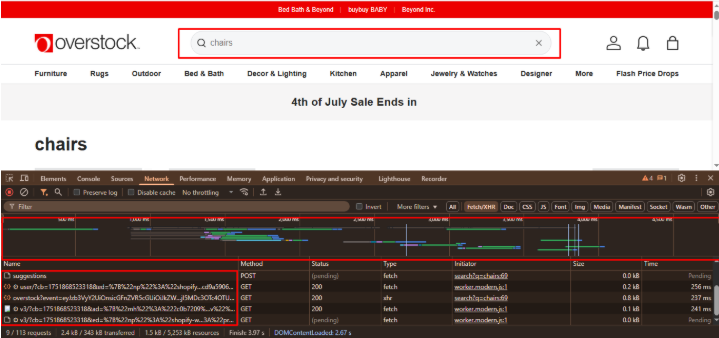
5. Look for Relevant API Endpoints
Scan the list of requests. You’re looking for endpoints that contain keywords like /v1/search, /search, or /api. For Overstock, a common endpoint might look like:
6. Inspect the API Response
Click on one of the API requests. Then, go to the Preview tab to see a structured, human-readable version of the JSON data.
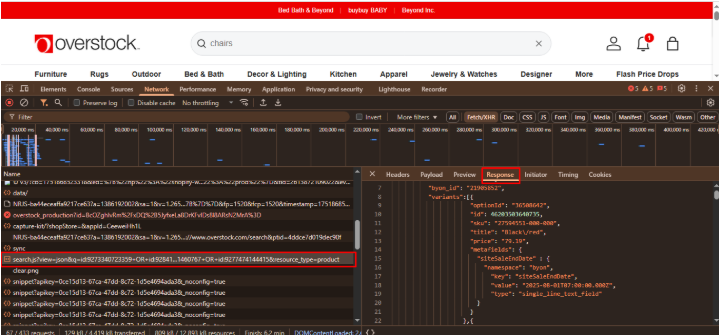
-
- Here’s what the API call and its JSON response look like in Chrome DevTools:
7. Copy the Full Request URL and Headers
Note the full URL and required headers (especially User-Agent) from the Headers tab. This info helps your Python script mimic a real browser.
Tools You’ll Need
- Python 3.7+
- A Python web scraping library like requests (pip install requests)
- A code editor (e.g., VS Code)
- Chrome DevTools (for API discovery)
These details are essential to mimic the request accurately and avoid errors like 403 Forbidden. Now that you’ve located the API and gathered its details, let’s write a Python script to scrape product data.
Why This Script Uses a GET Request (Not POST)
While some implementations use a POST request when interacting with hidden APIs, Overstock also provides a publicly accessible GET endpoint that returns clean product data in JSON format.
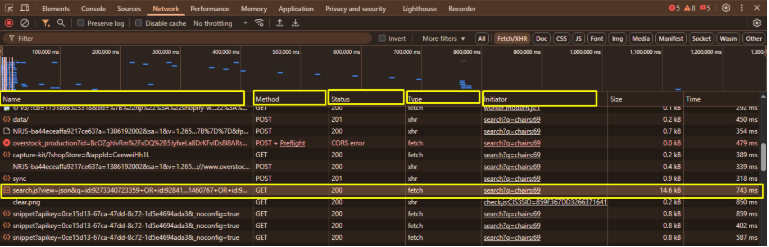
This method is ideal when:
- You only need search-based product listings
- You want a lightweight, straightforward implementation
- You’re avoiding additional request payloads and complexity
Using a GET request makes the process faster and simpler, especially when you’re just passing search terms via URL parameters.
It also lowers the risk of errors like invalid payload formats or missing headers, which are more common with POST requests.
Build the Best Python Web Scraper for Overstock Products Using the GET API
A Step-by-Step Tutorial to Build the Best Python Web Scraper Using GET Requests
We’ll now create a Python script to send a GET request to Overstock’s hidden API and extract structured product data.
We will write a Python script that:
- Sends a GET request to Overstock’s hidden search API with a search keyword
- Parses the returned product data in JSON format
- Saves the results to both .json and .csv files
We will use Python’s built-in libraries: requests, JSON, and CSV.
If you haven’t installed the requests library, install it using: pip install requests
If you’re looking to scale up and write more robust Python scrapers using libraries like BeautifulSoup, sessions, and error handling techniques, check out our Master Data Scraping: A Comprehensive Guide.
Step 1: Set Up Config and API Endpoint
Start by setting the search keyword (e.g., “chair”), the number of pages you want, and the API URL you captured from DevTools.
import requests

import json
import csv

# Configuration
search_term = 'chairs'
url = f'https://www.overstock.com/search.js?view=json&q=chairs'

headers = {
    'User-Agent': 'Mozilla/5.0'
}
Step 2: Send GET Request and Parse JSON
# Step 2: Send GET Request and Parse JSON
response = requests.get(url, headers=headers)
data = response.json()
Step 3: Save to JSON File
# Step 3: Save to JSON File
with open(f"{search_term}_products.json", "w") as f:
    json.dump(data, f, indent=2)
print("Done. Product data saved to JSON file.")
Step 4:Export Data to CSV for Excel or Google Sheets
To make the fetched product data easier to analyze or share, we convert it into a CSV file, a format compatible with spreadsheet tools like Microsoft Excel and Google Sheets.
Using Python’s built-in csv module, we extract selected fields from each product and write them to a .csv file. The filename dynamically includes the search keyword for easier identification.
# Step 4: Export Product Data to CSV
with open(f"{search_term}_products.csv", "w", newline='') as csvfile:
    writer = csv.writer(csvfile)
    writer.writerow(['Title', 'Price', 'SKU'])  # Customize as needed

    for product in data['products']:
        for variant in product['variants']:
            writer.writerow([
                variant['title'],
                variant['price'],
                variant['sku']
            ])

    print("CSV export complete.")
else:
    print(f"Request failed. Status Code: {response.status_code}")
Once the script runs, the terminal confirms successful data fetch and export:
Fetched 81 products for keyword 'chairs'
Done. Product data saved to JSON file.
CSV export complete.
PS C:\Users\dell\Documents>
Step 5: Run the Script and Review Output
Once this runs, check your folder to find both .json and .csv files with your product data.
C:\Users\dell\Documents\
You’ll find:
- chair_products.json
- chair_products.csv
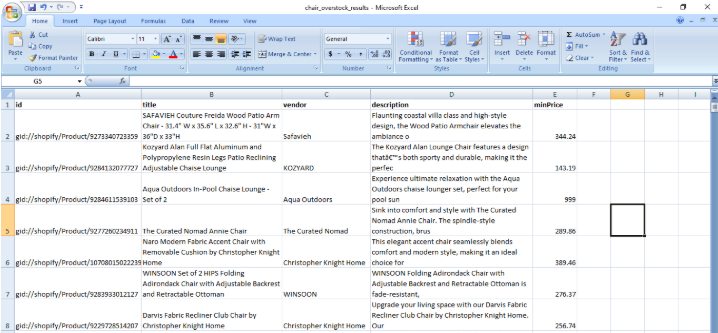
You can open the CSV in Excel or Google Sheets to view your data neatly in rows and columns.
Troubleshooting Common Issues
In case the script doesn’t work perfectly on the first try, here are some tips to troubleshoot common issues.
| Problem | Cause | Solution |
|---|---|---|
| 403 Forbidden | Bot detection | Add User-Agent header |
| No products in output | Wrong endpoint or query | Check DevTools again for accurate URL |
| JSON decode error | Malformed response | Check if you’re getting HTML instead of JSON |
With these quick fixes, your scraper should work smoothly. Now let’s address the legality of using hidden APIs for scraping.
Is This Legal?
Using hidden APIs to scrape publicly available data is generally legal for:
- Personal use
- Educational or research purposes
- Avoid commercial use unless permitted
- Check robots.txt and Terms of Service
- Respect site limits, don’t overload servers
You are responsible for how you use scraped data, and always do it ethically.
Conclusion
Scraping product data from Overstock using Python and hidden APIs is faster, cleaner, and more reliable than traditional HTML scraping.
By inspecting the site with Chrome DevTools, you can uncover the exact API Overstock uses, and then replicate the request using Python’s requests module.
Whether you’re monitoring prices, collecting inventory data, or building an internal analytics tool, this method will save time and give you structured, scalable results.
If you’re looking to implement this approach at scale or need a tailored scraping solution, contact us. We specialize in building powerful, API-driven data scrapers that are optimized for performance and compliance.
