Most teams that need web data today are still stuck in the same frustrating loop, even as AI-supported tools like Sequentum have made building data agents faster than ever.
A business analyst spots a data need, competitor prices, product listings, and market signals, and a developer still spends days writing a custom scraper, testing it, and pushing it to production. Three weeks later, the target website updates its layout, and the whole thing breaks. The cycle starts again.
Sequentum Agent Builder is built specifically to end that cycle. Turn a plain English description into a production-ready web scraping agent in minutes. And unlike purely AI-driven scrapers, after using Agent Builder for any basic scraper, you also have a rich visual editor to inspect, adjust, and control exactly what your agent does, down to the atomic level.
In this guide, you will learn exactly how Agent Builder works, how to build your first agent step by step using both the dashboard and the API, and why it beats traditional scraping at every stage.
New to Sequentum Cloud? Read article on Sequentum Cloud, Power, and Precision in Data Scraping.
Why Web Data Collection Is Still Broken for Most Businesses Today
To understand why Agent Builder matters, it is important to first look at why web data extraction remains a painful bottleneck for so many teams even today.
Getting data from websites sounds simple, but in practice, it is anything but. Every time a developer builds a scraper, they are writing fragile code tied to a specific website structure. The moment that the structure changes, the scraper breaks. And websites change constantly.
This process alone can take days or even weeks before a single record reaches production. Scaling it to hundreds of websites or millions of records demands even more infrastructure, more maintenance, and more ongoing cost.
Because of this, many businesses either outsource the work entirely or accept costly delays that slow down their entire operations.
This is exactly the challenge Agent Builder is built to solve, and it does so in a way that no traditional scraping approach can match.
AI vs Traditional Web Scraping: Key Differences
Now that you understand why traditional web data collection keeps breaking down, the question is, what makes AI web scraping fundamentally different? It is not just faster. It changes how scraping actually works at every level.
| Area | Traditional Web Scraping | AI Web Scraping with Agent Builder |
|---|---|---|
| Setup | Developers write custom code manually for every site. | Describe what you need in plain English; no code required |
| Who can do it | Only technical developers | Anyone on the team |
| Handling pagination | Custom logic is written separately for every site. | Understood and handled automatically |
| Scaling to more sites | Each new site requires new development work. | The same approach works across any site instantly |
| Error handling | Manual monitoring and restarts are required. | Detected and retried automatically |
| Output consistency | Variable and unpredictable across runs | Consistent and structured every time |
| When a site changes | The scraper breaks and must be rewritten from scratch | The user edits the agent directly in the visual editor and reruns. |
What is Sequentum Agent Builder?
Sequentum Agent Builder is built directly into Sequentum Cloud. You describe the data you need in plain English, and it builds a fully working web scraping agent for you: no coding, no technical setup, and no developer needed.
What makes it different from other scraping tools?
Most AI scraping tools use AI to both build and run the agent. Sequentum does not. AI is only used to build the agent. Once ready, the agent runs on its own precise, repeatable steps every single time, making your data consistent, trustworthy, and enterprise-ready.
What happens when a website changes?
When a target website updates its layout, the agent will need to be edited to reflect the new structure. Agent Builder is designed this way intentionally. It does not use LLM self-healing at runtime because it is unpredictable and untrustworthy in production environments.
Instead, the visual editor lets you see exactly what changed, fix it quickly, and trust your data completely.
Whether you are a business analyst who has never touched code or a developer who wants to stop writing boilerplate scrapers, Agent Builder is the fastest way to go from data need to data in hand.
How Agent Builder Automatically Plans, Builds, and Tests Your Agent
Here is what happens once you submit your prompt. Agent Builder follows a clear, automated process at each stage:
Stage 1: You Describe It.
You provide the target URL, the fields you want to collect, pagination, authentication needs, the shape of one complete record, and anything to skip. The more detail you include, from specifying the site to the webpage to the data you want in your prompt, the better your agent performs.
Stage 2: Agent Builder Does the Work.
Agent Builder loads the target website, identifies its structure, plans the navigation path, extracts sample records, and validates the output, exactly the analysis a developer would perform manually, except it happens in minutes rather than days.
It automatically handles pagination across multiple pages, navigates nested data structures and sublists, and works through website blocking mechanisms such as CAPTCHAs and IP restrictions without any manual intervention.
Want to understand how unblocking works under the hood? Read our article on How to Unblock Websites in Sequentum Cloud While Web Scraping.
Stage 3: Your Agent Is Ready to Run Anywhere.
Once saved, your agent lives inside Sequentum Cloud and can be run as is. You also have the option to open it in the visual editor to review or customize every step and detail, attach a schedule for recurring runs, trigger it via the Sequentum API, or connect to it through MCP to use it directly inside AI-powered tools and workflows.
Two Ways to Use Agent Builder: Dashboard and API
Sequentum Agent Builder is designed for both non-technical users and engineering teams. Therefore, it offers two distinct paths depending on how you prefer to work.
| Situation in Real Use | Control Center Dashboard | API via Postman |
|---|---|---|
| Who it is best for | Business users, analysts, non-developers | Developers and engineering teams |
| Requires coding knowledge | No | No, Postman handles it visually. |
| Best use case | One-off agents and exploration | Pipelines, automation, and production scale |
| Time for the first agent | Under 5 minutes | Under 10 minutes |
| How do you access it | Click-based browser UI | HTTP requests via Postman |
Both paths produce the exact same result: a real, versioned agent, ready to be reviewed and run or further refined in the Visual Editor for deep customization or before anything runs at scale. The difference is simply how you get there. Let us walk through each one in detail.
How to Scrape Data From a Website Using AI: Step-by-Step
You’ve seen the two approaches Sequentum Agent Builder offers; now let’s walk through how each one actually works, step by step.
Method 1: How to Build Your First Agent Using the Dashboard
For business users and analysts, the dashboard is the fastest and simplest path. In fact, if you can type a text message, you can build an agent this way, no technical background needed whatsoever.
Step 1: Log In to Sequentum Cloud
- Open your browser and go to dashboard.sequentum.com.
- Log in with your account credentials to reach the Control Center, your main workspace.
Step 2: Open Your Space and Click New Agent.
- Inside the control center, click the + New Agent button.
- A screen appears asking you to choose how to get started. You will see the Build with AI option marked as RECOMMENDED at the top.
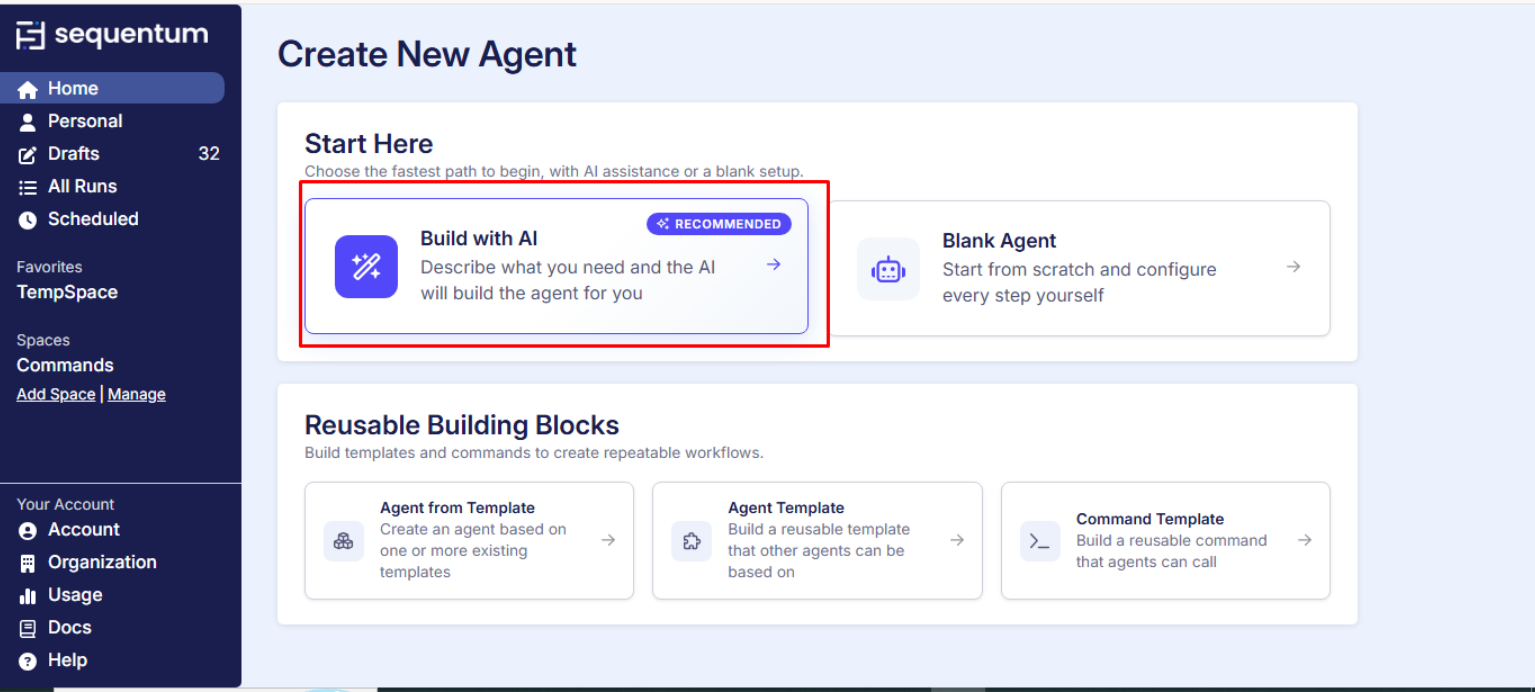
Click Build with AI. This opens the Agent Builder chat interface: a simple text box where you describe exactly what you need.
Step 3: Type Your Prompt
This is the most important step. Type a clear, detailed description of the data you want to collect. Remember, Agent Builder works best when you describe the website, webpage and details on what you want
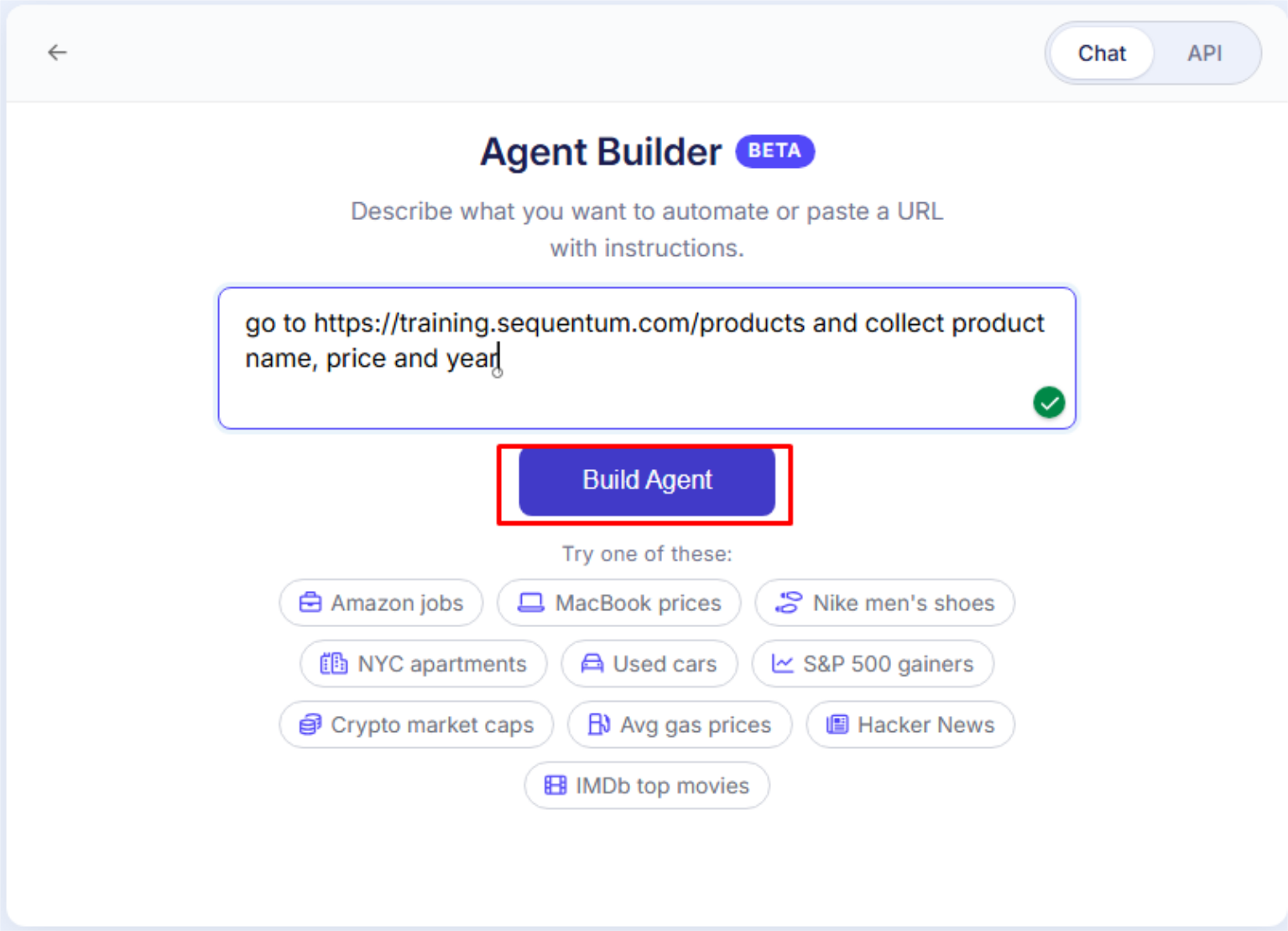
For the best results, always include these details in your prompt:
- The exact website URL
- The navigation to follow after loading the URL
- The specific fields you want to collect
- Whether to follow pagination or multiple pages
- Any items or sections to skip
- Whether the site requires a login
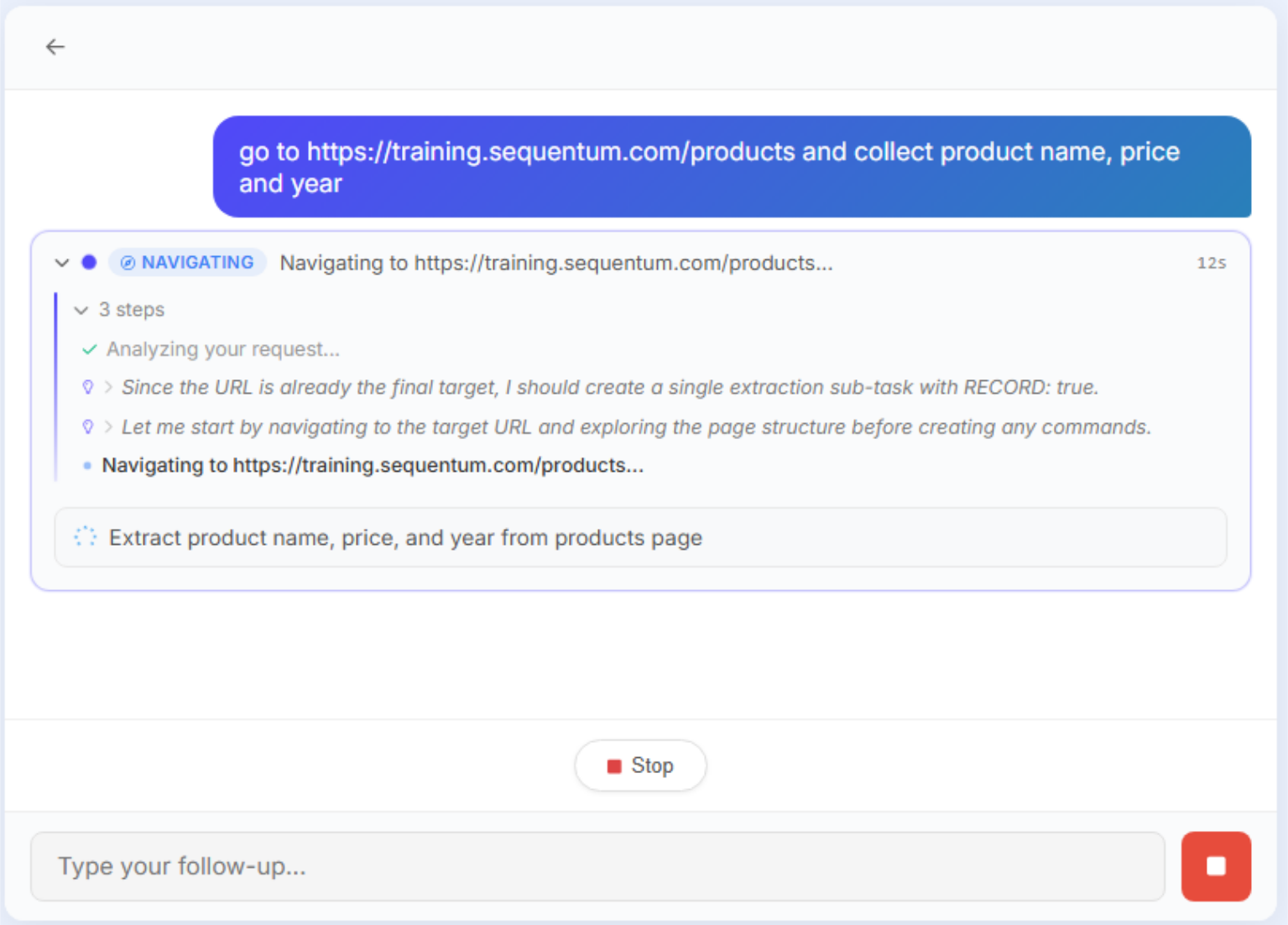
Step 4: Watch Agent Builder Work Automatically
After submitting your prompt, Agent Builder starts immediately. You will see it plan, navigate the live site, extract sample data, and validate output, all in real time. No action is needed from you during this stage.
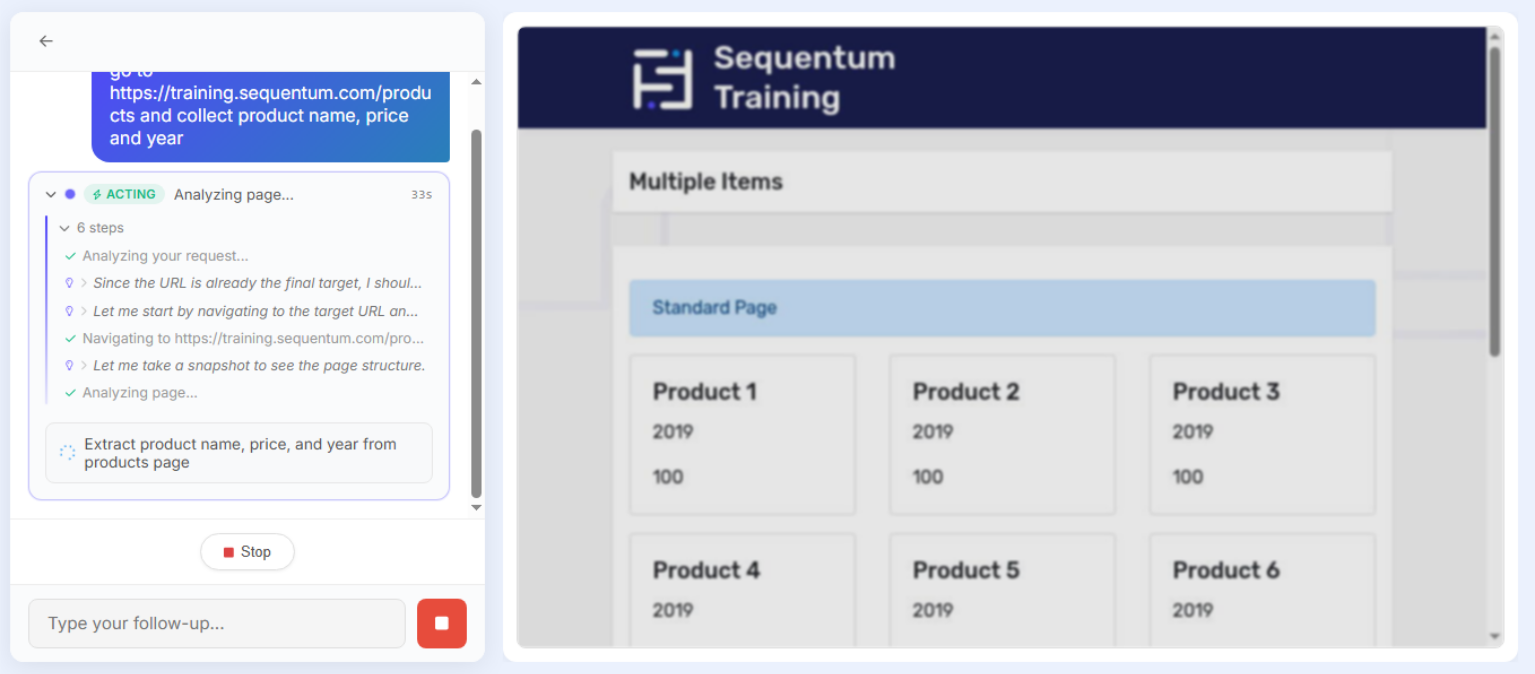
Most simple agents are ready in under two minutes.
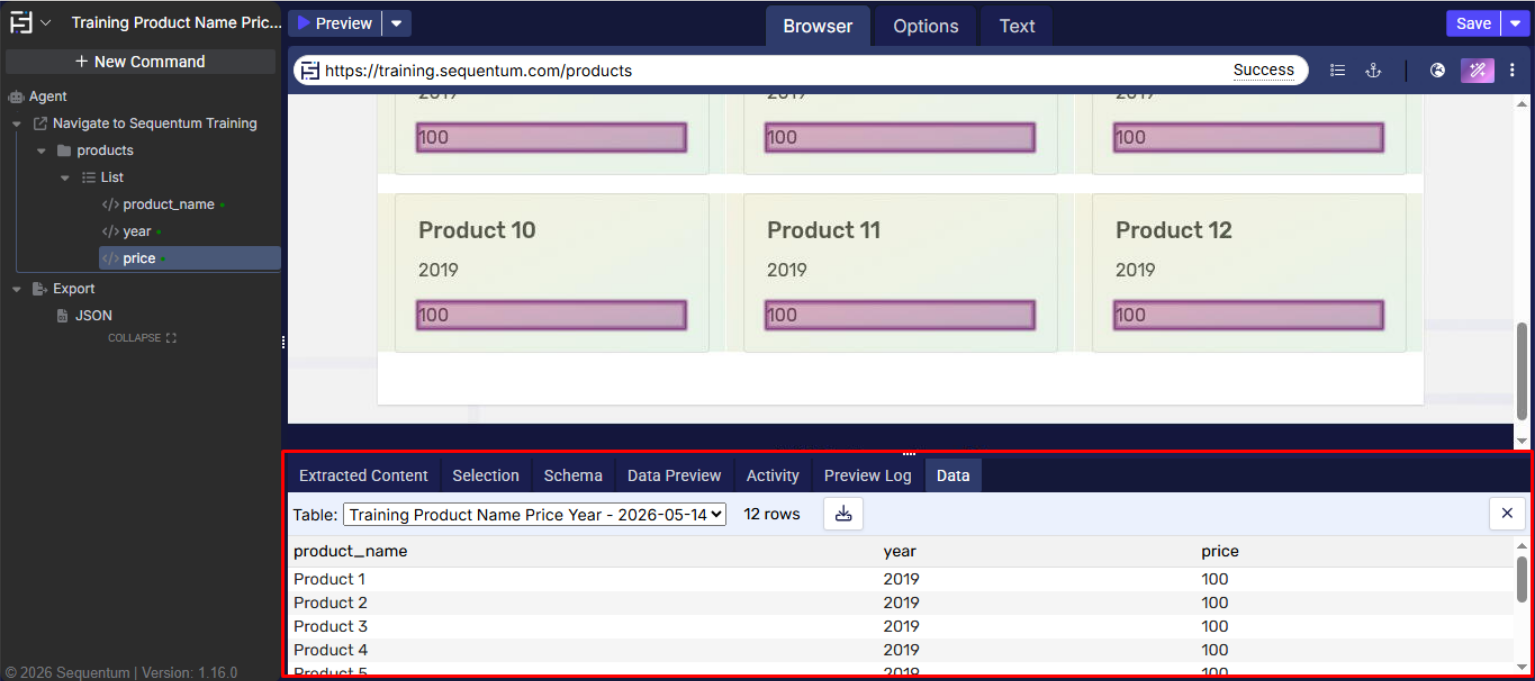
Step 5: Preview Your Extracted Data and Refine
Once completed, Agent Builder shows you a preview of the extracted data on the right side of the screen. If everything looks correct, you are ready to proceed.
If you need changes, you can refine and customize any aspect of the agent in the Visual Editor or run or schedule or run via API.
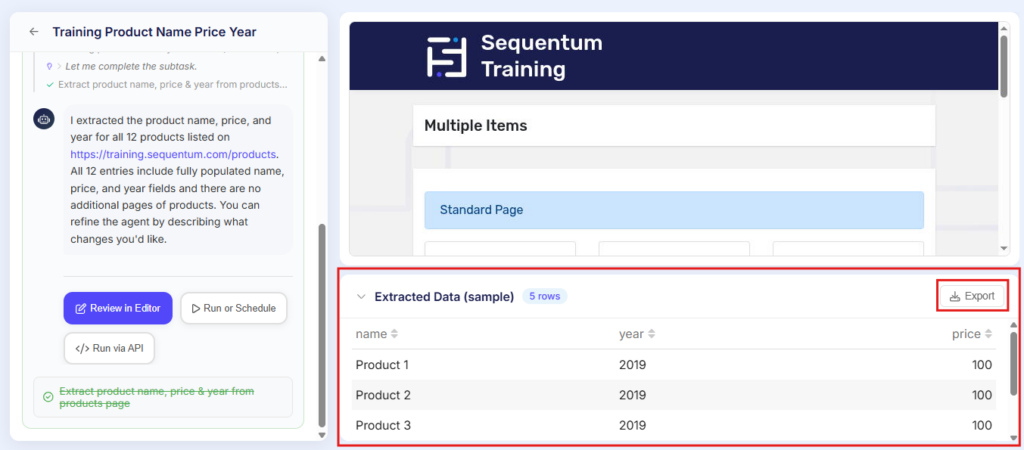
Step 6: Click Review in Editor.
If you want to add any additional commands, adjust the structure, or customize the extraction further, click “Review in Editor ” to access the full visual editor where you have complete control over every detail.
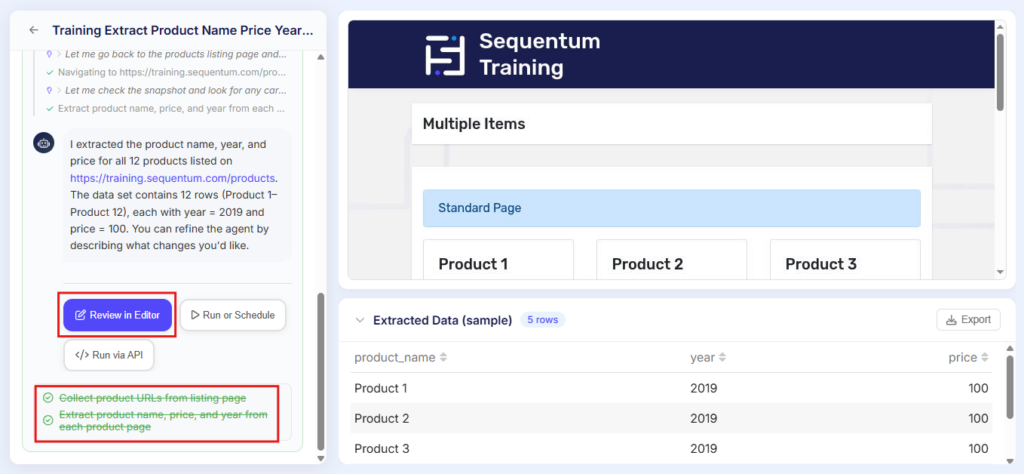
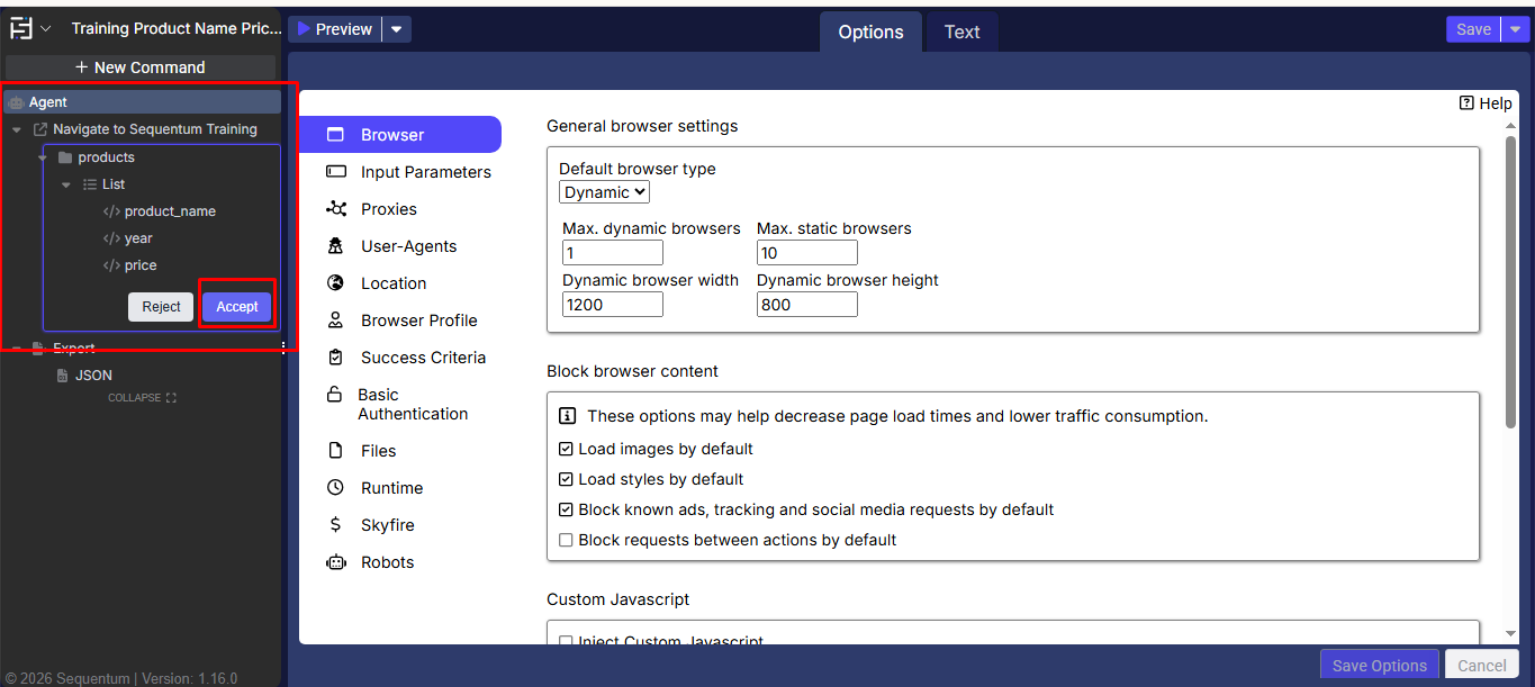
Step 7: Run Your Agent
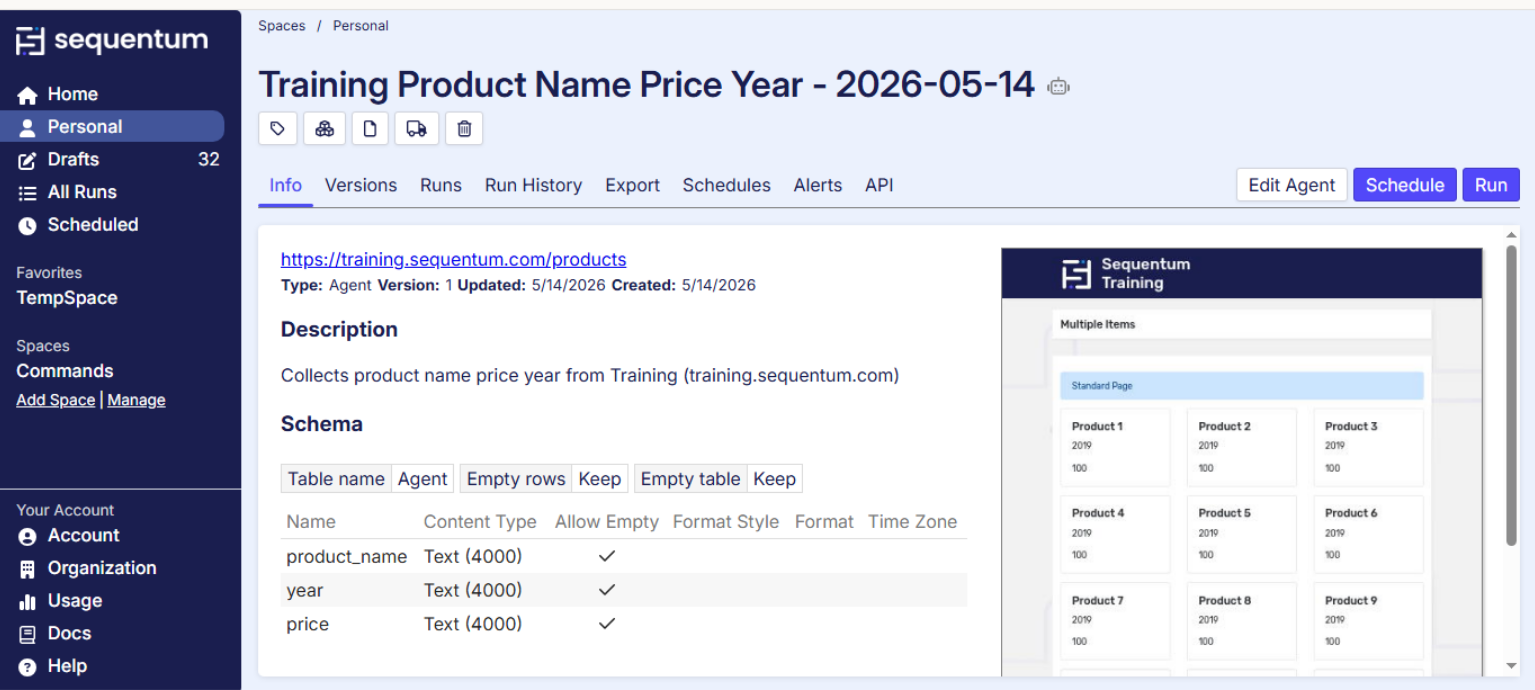
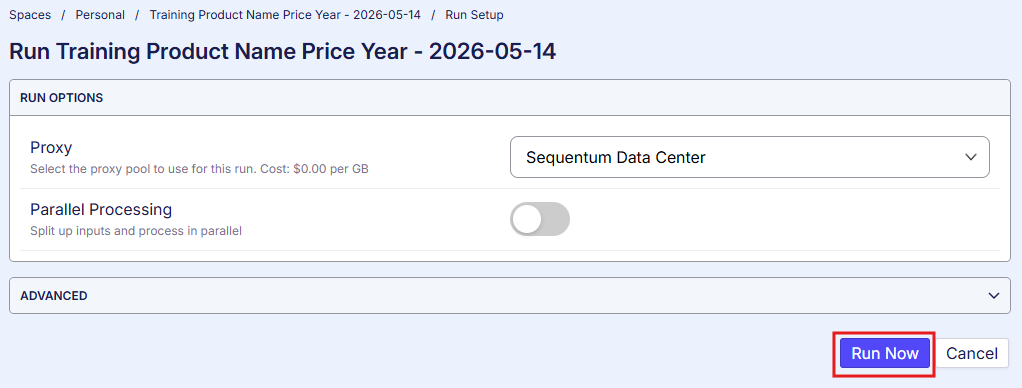
Click the Run or Schedule button to open the agent detail page, then click the Run button. A new window will open; click Run Now. Your agent will then visit the target website, collect all specified data, and save the results. You can view or download the output directly from the dashboard at any time.
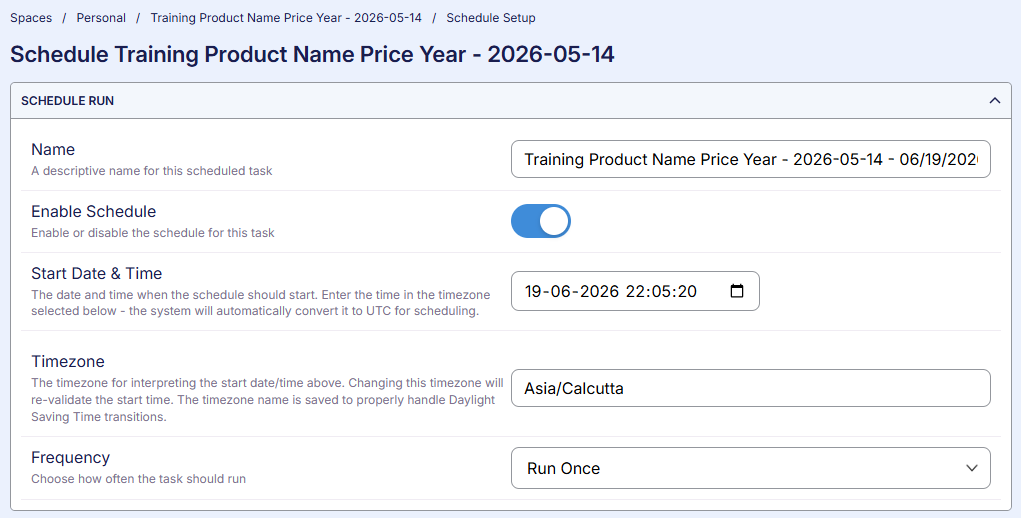
Step 8: Schedule Automatic Runs (Optional)
If you want your agent to run automatically on a recurring basis, attach a schedule from the agent detail page. Options include daily, weekly, hourly, or any custom interval. Once scheduled, your data collection runs completely on autopilot.
Method 2: Run via API Directly From the Dashboard
After building your agent through the dashboard, Sequentum gives you the exact API command pre-filled and ready to use; no manual setup is required.
Step 1: Click Run via API.
After your agent builds successfully, you will see three buttons on the screen: Review in Editor, Run or Schedule, and Run via API. Click Run via API.
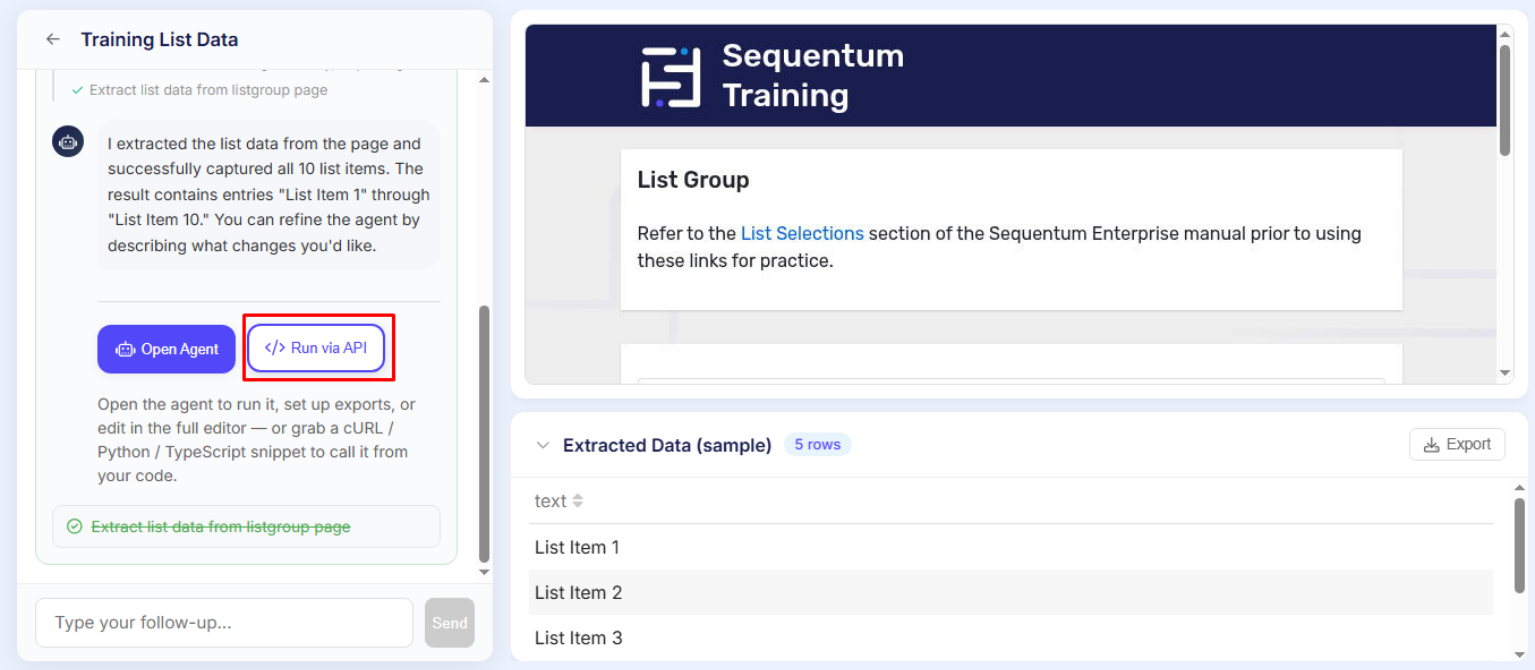
Step 2: Copy the cURL Command
A popup will appear containing the exact cURL, Python, and TypeScript code for your agent. The code is pre-filled with the correct URL, your authorization header, and your request body, making it ready for you to copy.
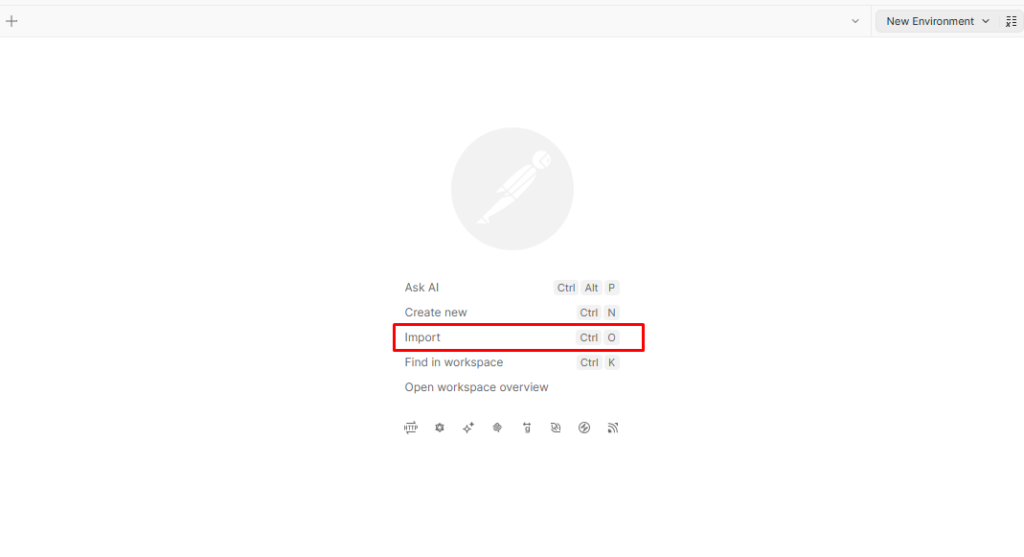
Step 3: Open Postman and Import the Command
Open Postman and press Ctrl + O to open the Import dialog
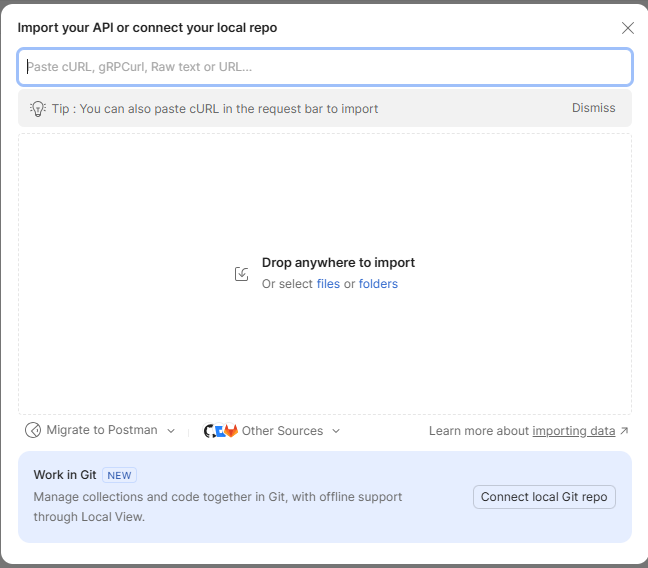
Paste the copied cURL command directly into the text box
Step 4: Let Postman Do the Rest
Postman automatically reads the command and fills in the method, URL, headers, and body for you. Click “Import into collection.”
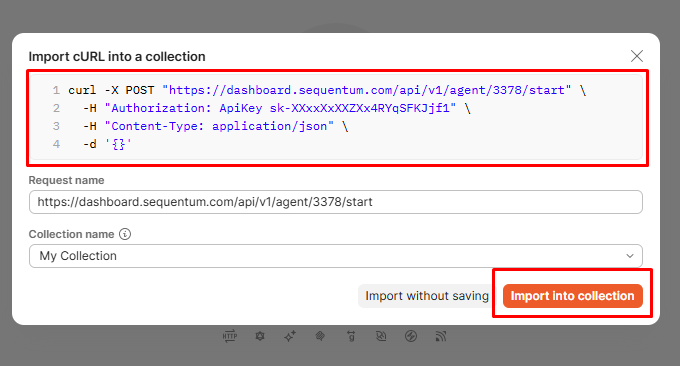
Step 5: Send and Run
Click Send. Your agent runs immediately: no manual setup, no typing, and no mistakes.
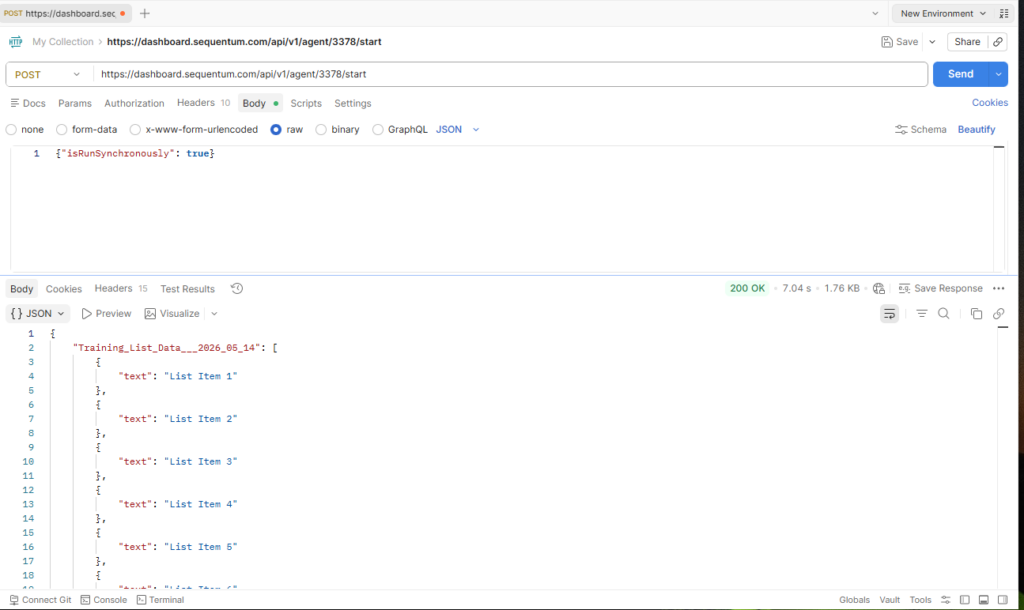
This is the fastest path from the dashboard to the API: no manual setup, no typing, and no mistakes.
Want to Understand How This Works Under the Hood?
When you click Run via API, Sequentum communicates with its API to trigger, monitor, and return your agent’s data. For developers who want full programmatic control and prefer to do this manually, here is exactly how it works step by step using Postman.
Method 3: How to Build and Run an Agent Using the API in Postman
Agent Builder is fully accessible through the Sequentum API. Postman is the easiest tool to use; it provides a visual interface for sending API requests without writing any code.
Before you start, make sure you have:
- A Sequentum Cloud account
- Your API key from the dashboard. sequentum.com/users/api-keys
- Postman installed (free at postman.com)
The entire process requires just three API calls.
Call 1: Start the Build—POST Request
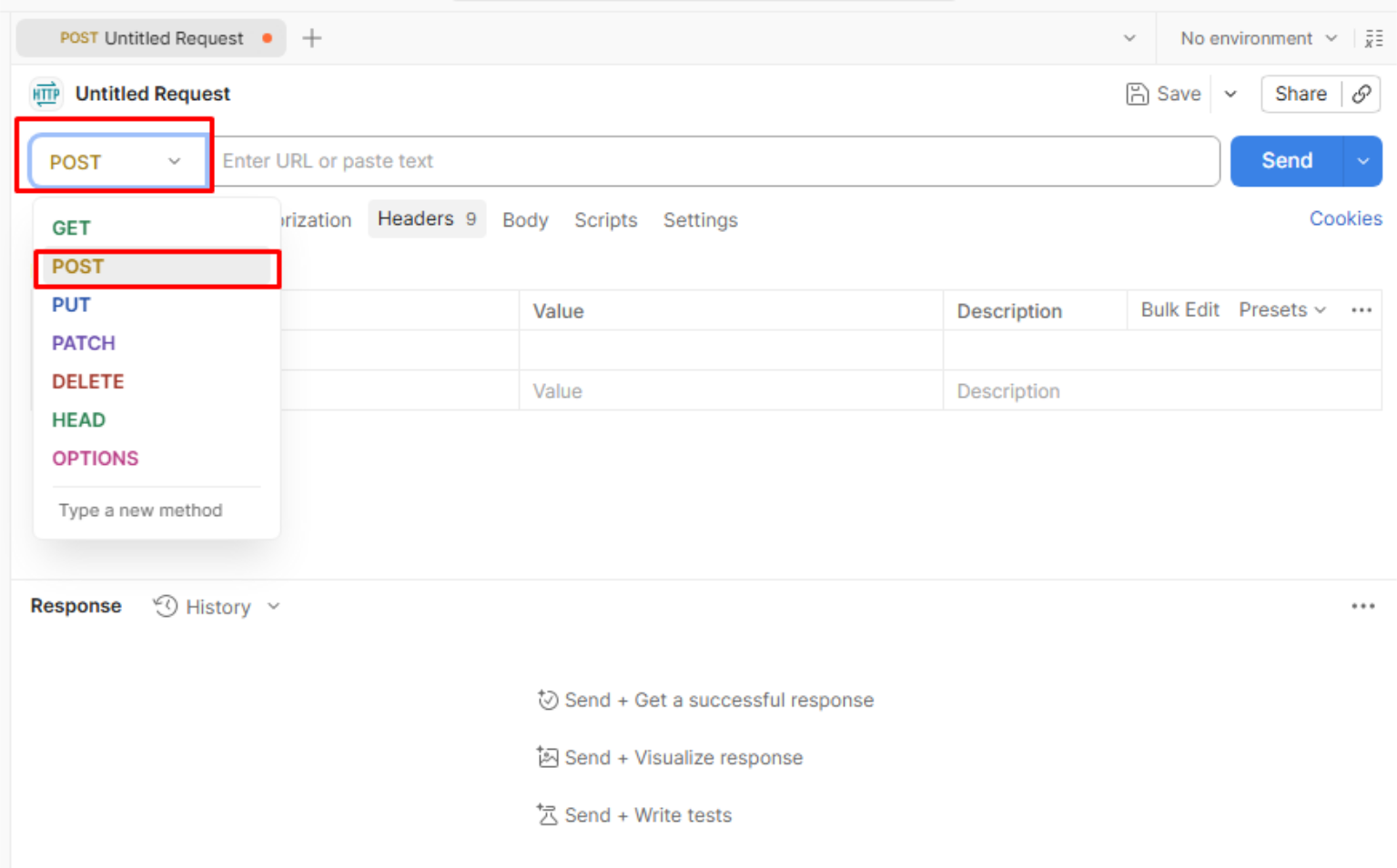
Open Postman and click the + button to open a new request tab. Click the method dropdown on the left and select POST.
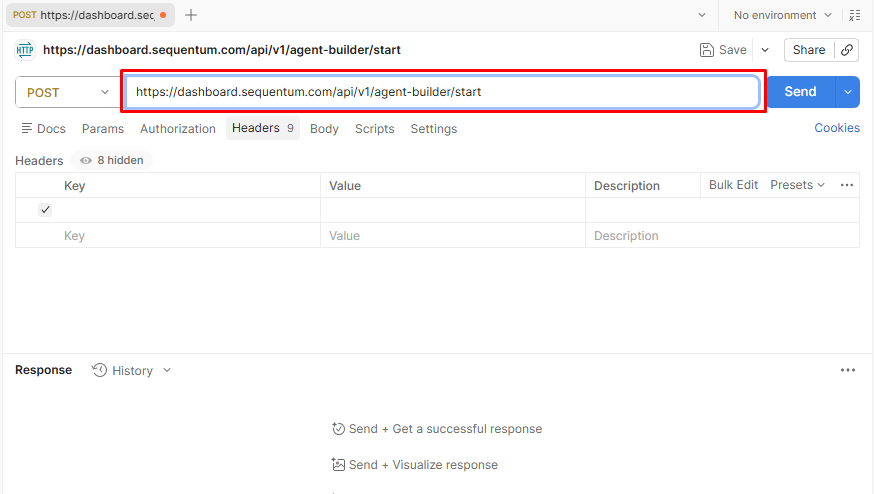
In the URL bar, paste this endpoint exactly: https://dashboard.sequentum.com/api/v1/agent-builder/start
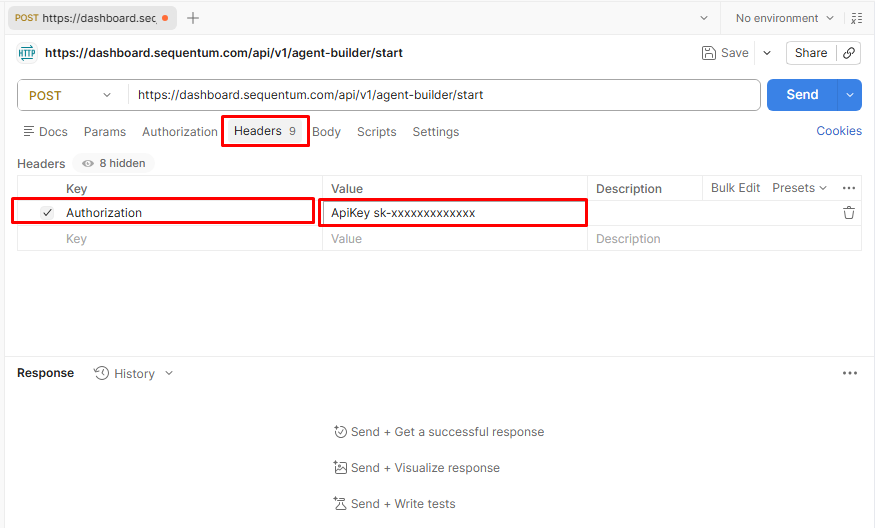
Click the headers tab and add your authorization.
- Key: Authorization
- Value: ApiKey sk-xxxxxxxxxx
Replace sk-xxxxxxxxxx with your actual API key from the dashboard.
Click the Body tab, select raw, change the format to JSON, and paste your prompt:
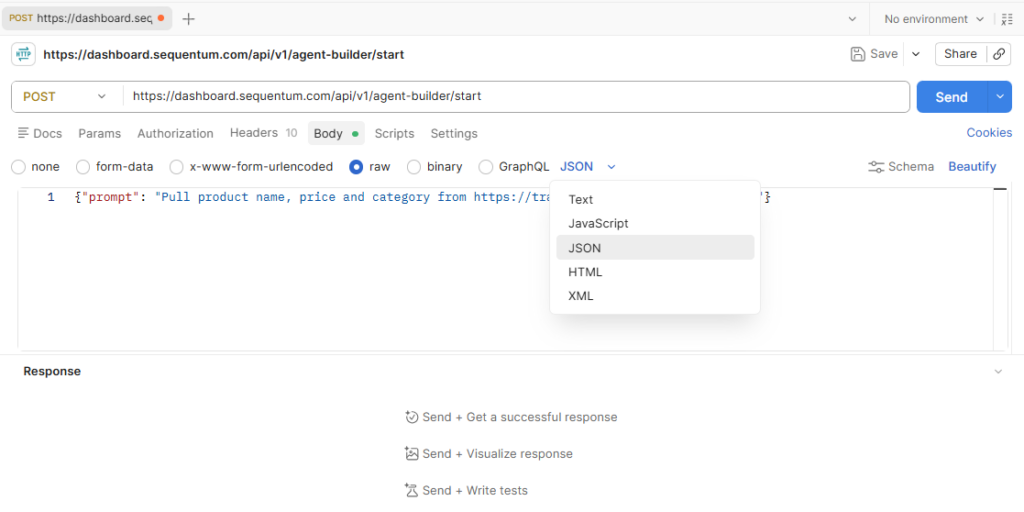
Click Send. You will receive a sessionId in the response. Copy it immediately; you need it in the next step.
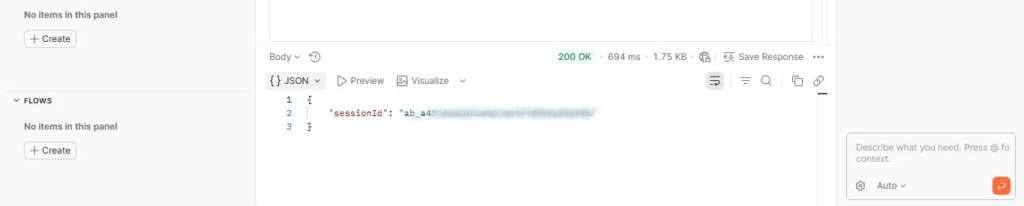
Call 2: Check Build Status — GET Request (Understanding Sessions)
Before you start polling, it helps to understand what is actually happening behind the scenes, because the status response has more nuance than a simple “done or not done.”
What Is a Session?
Every time you submit a prompt to Agent Builder, a session is created. A session is the complete lifecycle of a single build, from the moment Agent Builder starts loading the target website to the moment the finished agent is saved to your account.
Sessions move through three phases:
| Phase | What Is Happening |
| Building | Agent Builder is loading the site, planning navigation steps, extracting sample records, and testing the result. |
| Ready | A draft agent exists, but the session is still finalizing; do not treat this as finished yet |
| Run | Build is complete; your agent is ready to run, schedule, or edit |
How to Poll
Open a new tab in Postman. Change the method to GET and enter this URL, replacing {sessionId} with your actual value: https://dashboard.sequentum.com/api/v1/agent-builder/{sessionId}/status
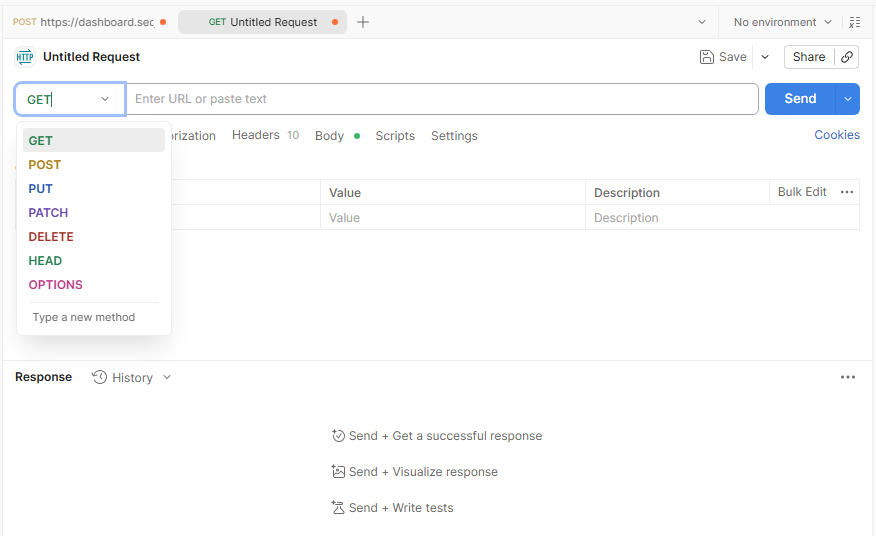
Add the same Authorization header.
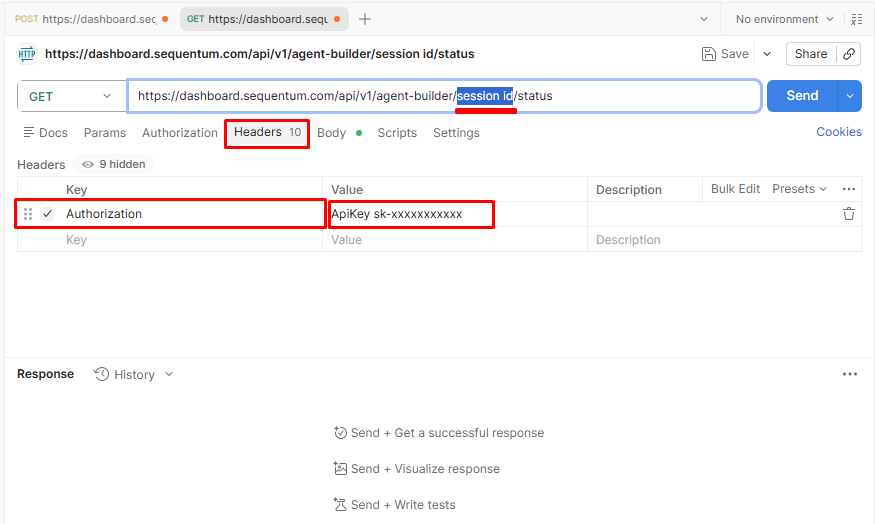
Click on the Send button every 5 to 10 seconds. Keep polling until the status is completed.
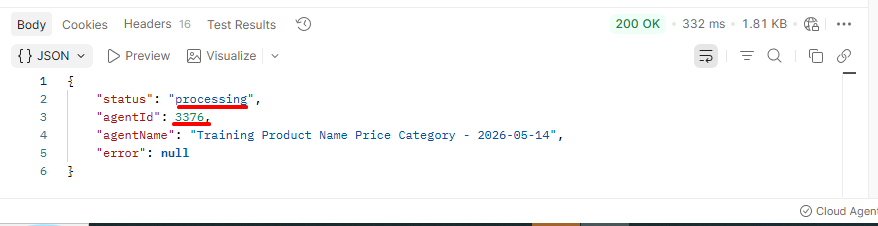
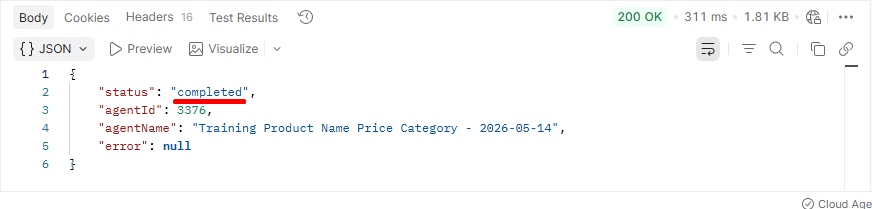
When you see “completed,” copy the agentId from the response. That is your new agent’s unique ID, and you need it for calling the 3rd API.
Call 3: Run Your Agent and Get the Data — POST Request
Open another new tab. Change the method to POST and enter this URL, replacing {agentId} with your actual value: https://dashboard.sequentum.com/api/v1/agent/{agentId}/start
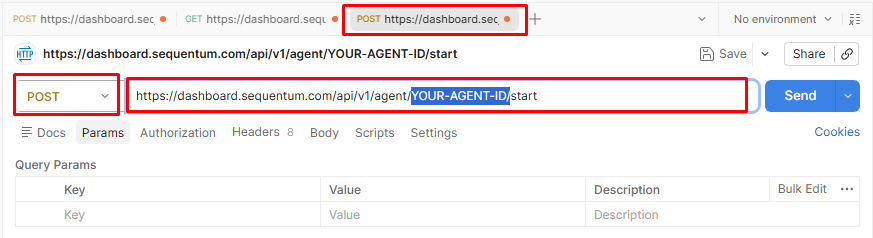
Add both headers:
- Key: Authorization, Content-Type
- Value: ApiKey sk-xxxxxxxxxx, application/json
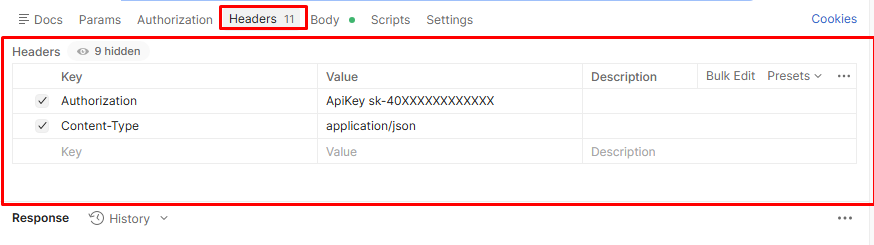
In the Body tab (raw → JSON)
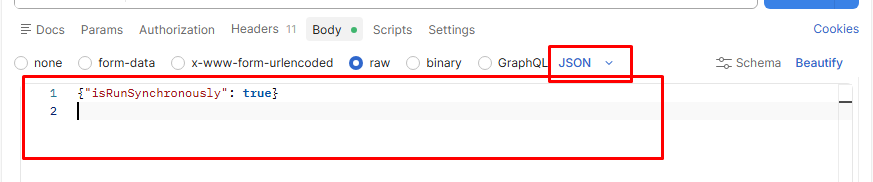
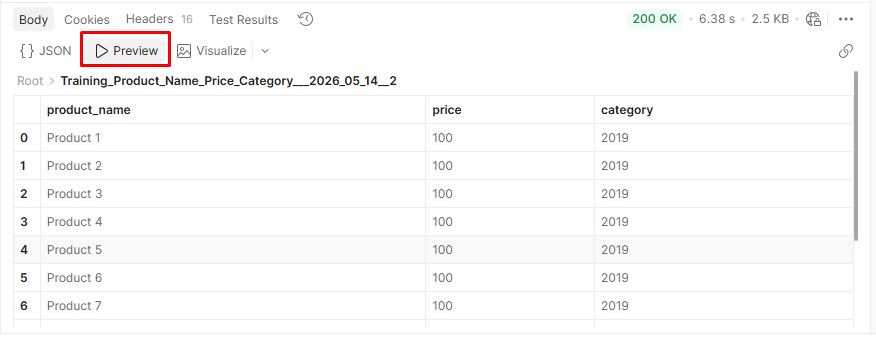
Click Send. Your extracted data comes back immediately as structured JSON. Click the Preview tab to see it in a clean table format.
Run via API vs. Postman API: What Is the Difference?
After going through both methods, you might be wondering, are these two approaches doing the same thing? The answer is no. Here is exactly how they differ:
| What You Did in Postman | Run via API Button | |
| What it does | Built the agent AND ran it | Only runs an already existing agent |
| Steps needed | 3 steps; POST → GET → POST | Just 1 step |
| Who creates the agent? | You built it from scratch using a prompt. | The agent was already built by the dashboard. |
| Best for | Creating brand new agents programmatically | Running existing agents quickly |
Key Advantages of Using Sequentum Agent Builder for Enterprise Data Collection
Beyond speed and simplicity, Agent Builder, even in its beta version, delivers several important advantages that make it stand out for enterprise data teams:
- Deterministic and Repeatable Execution: AI is used to build the agent but no AI is used at runtime. Agents run the same reliable steps every time, eliminating inconsistent or unpredictable data that breaks downstream processes and undermines trust across your pipelines.
- Plain English Setup: No scripting or technical knowledge is required. Any team member can describe what they need and receive a fully versioned agent, without waiting for a developer to become available.
- Rich Visual Editor: The standout differentiator of Agent Builder is its powerful visual editor. Once an agent is generated, users can see exactly what it is doing and customize its behavior at the atomic level, no code required. This gives teams full transparency and precise control over their data collection, something no purely AI-driven scraper can offer. That level of precision is rare, and for teams where data quality drives decisions, it is a genuine competitive edge (while other teams are working from approximations, yours is working from data built to your exact specifications).
- Built-In Unblocking: Agent Builder handles websites that actively resist scraping (with HITL oversight), including CAPTCHA challenges, IP blocking, and bot detection, so your agents keep running without manual intervention or third-party workarounds.
- Automatic Pagination: Agents automatically navigate through multi-page results, collecting data across every page without stopping at page one. No extra configuration needed.
- Sublist and Nested Data Handling: Agent Builder understands layered, hierarchical data structures, such as categories with sub-items or tables within tables, and extracts them accurately into clean, structured outputs.
- Human-in-the-Loop Oversight: Sequentum’s HITL model keeps data pipelines compliant and accurate at every stage. Users remain in control of key decisions, a critical requirement for enterprise governance and regulatory compliance.
- Audit Logs and Compliance Tools: Built-in audit logs record every action taken by every agent, giving your team a full, traceable history of data collection activity. This is essential for regulated industries that require accountability and documentation.
- MCP and API Access: Agent Builder works where your team already works. Connect via MCP for seamless integration with AI workflows and tools, or use the API to embed data collection directly into your existing systems and pipelines.
- More Cost-Effective Than Competitors: Sequentum is purpose-built for production-scale data collection, with pricing designed to make high-volume extraction economically viable, delivering more value at a lower total cost than current market alternatives.
- SOC 2 Type II Certified: Security and compliance are built into the core of the Sequentum platform, not bolted on as afterthoughts. This makes Sequentum a trusted, auditable vendor for enterprise data workflows in regulated industries.
- Schedulable and Versionable Agents: Every agent can be scheduled for automatic recurring runs and versioned for full change tracking, all without any additional infrastructure or tooling required on your side.
Conclusion
As you have seen, Sequentum Agent Builder makes web data collection faster, simpler, and more cost-effective than ever. You can build agents for any website, any data type, and any scale, all in plain English, all in minutes, and fully compliant (and still have access to the Visual Editor for all the control and customization you need).
Ready to build your first agent? Agent Builder is live now in Sequentum Cloud; find more information here or sign up here to get started today.
